Records and drawers
Every count on the property page opens the rows behind it. How the Records card and its drawers work.
The property page summarizes; the records are the evidence. Every count on the page, and every row of the Timeline, opens a drawer on the right holding the rows behind it, so you can check any figure against the public record it came from.
The Records card
Near the bottom of the property page, the Records card (subtitle: every count opens the rows behind it) gathers every set of records BlockLot holds for the building, grouped by the question you are asking:
- Distress: violations, 311 complaints, housing-court cases, HPD and FDNY vacate orders, HPD's Alternative Enforcement program, HPD repair charges, tax-lien sale listings, evictions, and tax exemptions that were removed.
- Transactions & debt: deeds and sales, mortgages and liens, the parties named on each deed with their mailing addresses, and HPD's speculation watch list.
- Construction: permits, job filings, certificates of occupancy, major construction projects, stalled construction sites, after-hours work variances and electrical permit items.
- Tax & value: the assessment history and tax exemptions.
- Contacts: all contacts, contacts named on permits, and the contacts on the building's HPD registration.
- Area & flags: crime in the police precinct, and whether the City owns or leases the lot.
- Occupants: the businesses on record and, where any exist, recorded leases.
Each button shows a count. Where a record can be open or closed, the button spells both out, for example "(3 open; 41 closed)", using the agency's own words: violations are open or closed, vacate orders active or rescinded. Showing the total matters: a landlord with many closed housing-court cases and none pending reads 0 on the first number but tells you something on the second.
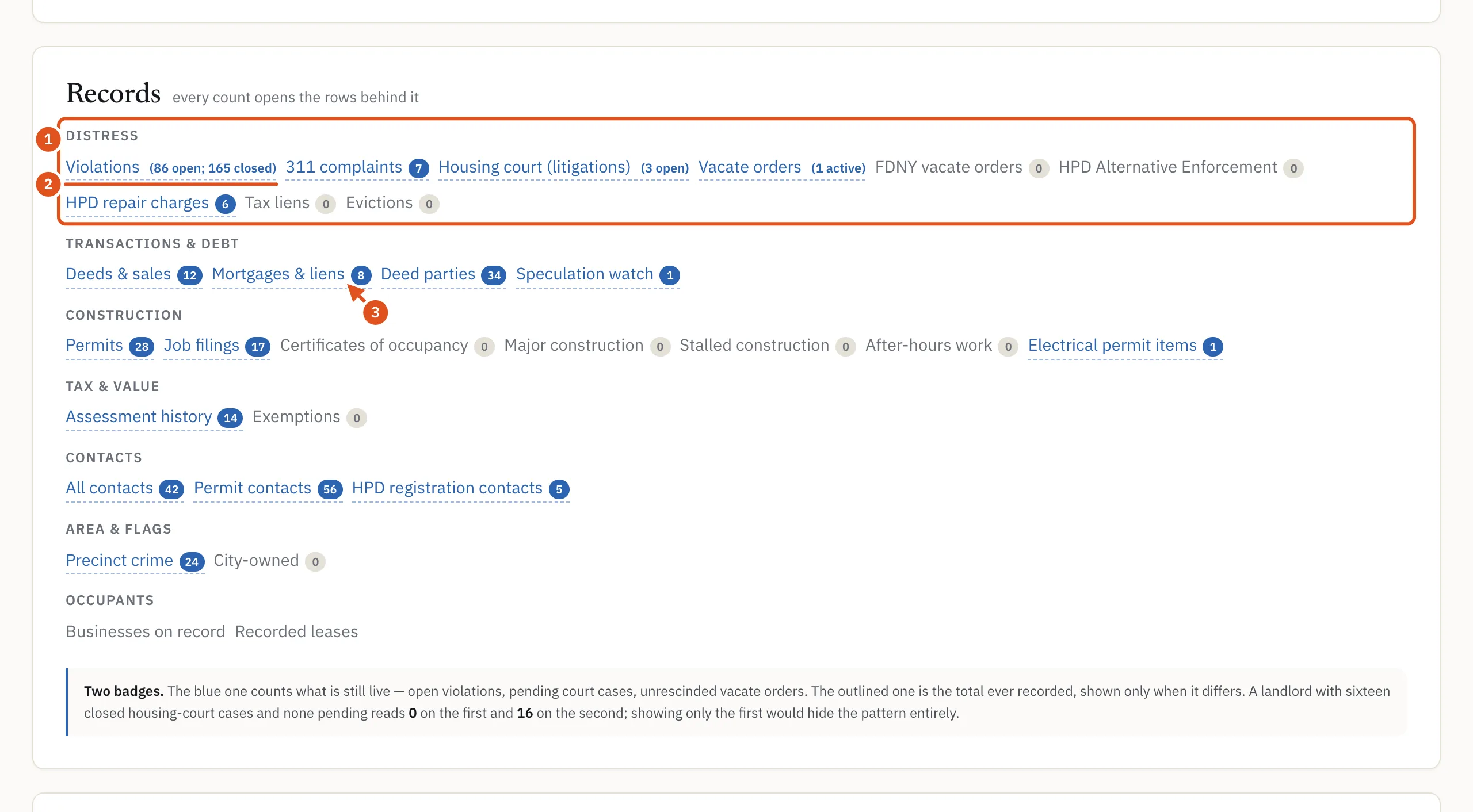
- Distress records
- Open and closed, spelled out
- Opens a drawer
Reading a drawer
Click any button, any count on the page, or any Timeline row, and a drawer opens on the right. Close it with the × in its corner.
- The heading names the set and the number of rows.
- Under it, a short paragraph says what the records are and, just as important, what they are not. A violation is an inspector's finding, not a court judgment. A mortgage amount is the face value when it was recorded, not today's balance. A deed's amount is what the parties wrote on it, and a blank does not mean the building changed hands for nothing.
- Some drawers add a note or a boxed caveat about the source's limits. Read these before you draw a conclusion.
- Then the rows. Click a column heading to sort by it. On a phone, each row stacks as label and value pairs.
Some columns link out to the official record. On deeds, mortgages and recorded leases, the document number opens the recorded document in ACRIS, the City Register's system. The certificates of occupancy drawer links to the Department of Buildings' own records for the building, even when the drawer itself is empty, because older certificates exist only there. Coded values, such as a building class or a document type, open a short definition when you click them.
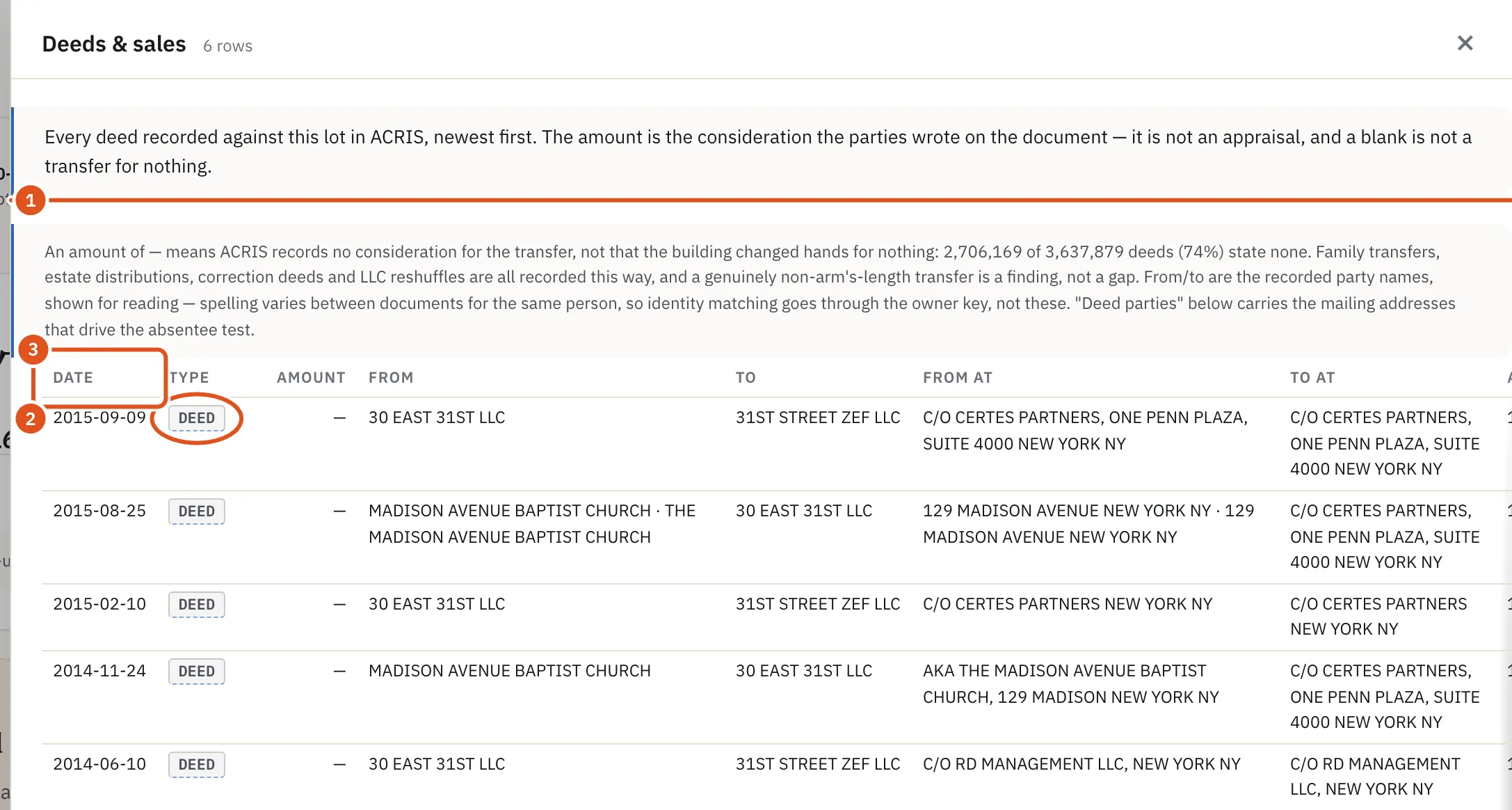
- What these records are
- Opens its definition
- Click to sort
Row history
BlockLot checks the public sources every day and records what changes. In drawers that support it, a row that has changed since BlockLot began watching it carries a line such as 1 change recorded. Click it to see when BlockLot saw each change and what moved from what to what. The drawer's opening paragraph says the date BlockLot began observing that kind of record. Anything earlier is the source's own record, not something BlockLot watched happen, so a row without a change line does not prove nothing changed.
The distress breakdown
The distress score at the top of the page opens a drawer of its own: one row per component, with what was measured, its weight and its contribution to the score, including the components that scored zero. See Distress signals and liens.
Who can open drawers
You need to be signed in. A visitor who is not signed in sees the record names but no buttons.
The drawers come with the building's full report. Opening a property page with your plan counts once against your monthly allowance, and from then on, for the rest of that period, the drawers and the PDF of that building cost nothing more. If the full report for a building has not been opened in the current period (for example, on a free account or once your allowance is used up), a drawer answers "Open the property page first — drill-downs are included with the report, and this building has not been opened in the current period."
What a drawer shows follows your plan. Contact details, for example, appear only on plans that include contacts. See Accounts and plans.