Businesses and leases at a building
Which businesses public records place at a building, its storefront vacancy over the years, reported lease end dates and recorded leases.
Four parts of the property page are about who does business in a building and for how long: Businesses on record, Storefront history, Lease expirations and the Recorded leases drawer. Use them to see a building's retail and office mix, spot vacancy, and find leases coming up for renewal.
Each card appears only when the building has something to show, so a residential walk-up may have none of them.
Businesses on record
This card lists businesses that public records place at the address: City licences, restaurant and child-care inspections, the City Planning facilities list, State and federal licences and registries, and rent-abatement filings with the Department of Finance (DOF). Each record is matched to the building by the lot number it carries, and each row names its sources with a badge. Click a badge to see that source on the Sources & licences page.
The summary line at the top reads, for example, "12 storefronts · 2 vacant · 8 named". Storefronts and vacancy are as the owner filed them under Local Law 157, the City's storefront registry. named counts the storefront businesses listed below. Under it, a short line compares This block and the neighborhood's storefront vacancy.
The businesses are grouped under Storefronts and Offices & other. Each row gives the business, its category, the suite or floor where a record states one, its sources and its dates: on record since and last on record. When there are more rows than fit, and N more — show all opens the full list. Earlier records lists businesses with explicit evidence that their record ended, such as an expired licence.
- Applications lists pending liquor-licence applications to the State Liquor Authority and pending premises-licence applications to the Department of Consumer and Worker Protection. As the card says, an application is not a licence: the business may never open here.
- Businesses run by an individual, or registered at what is probably a home, are counted and not named.
- A business name that is a link opens its business page, which lists every building the business is on record at.
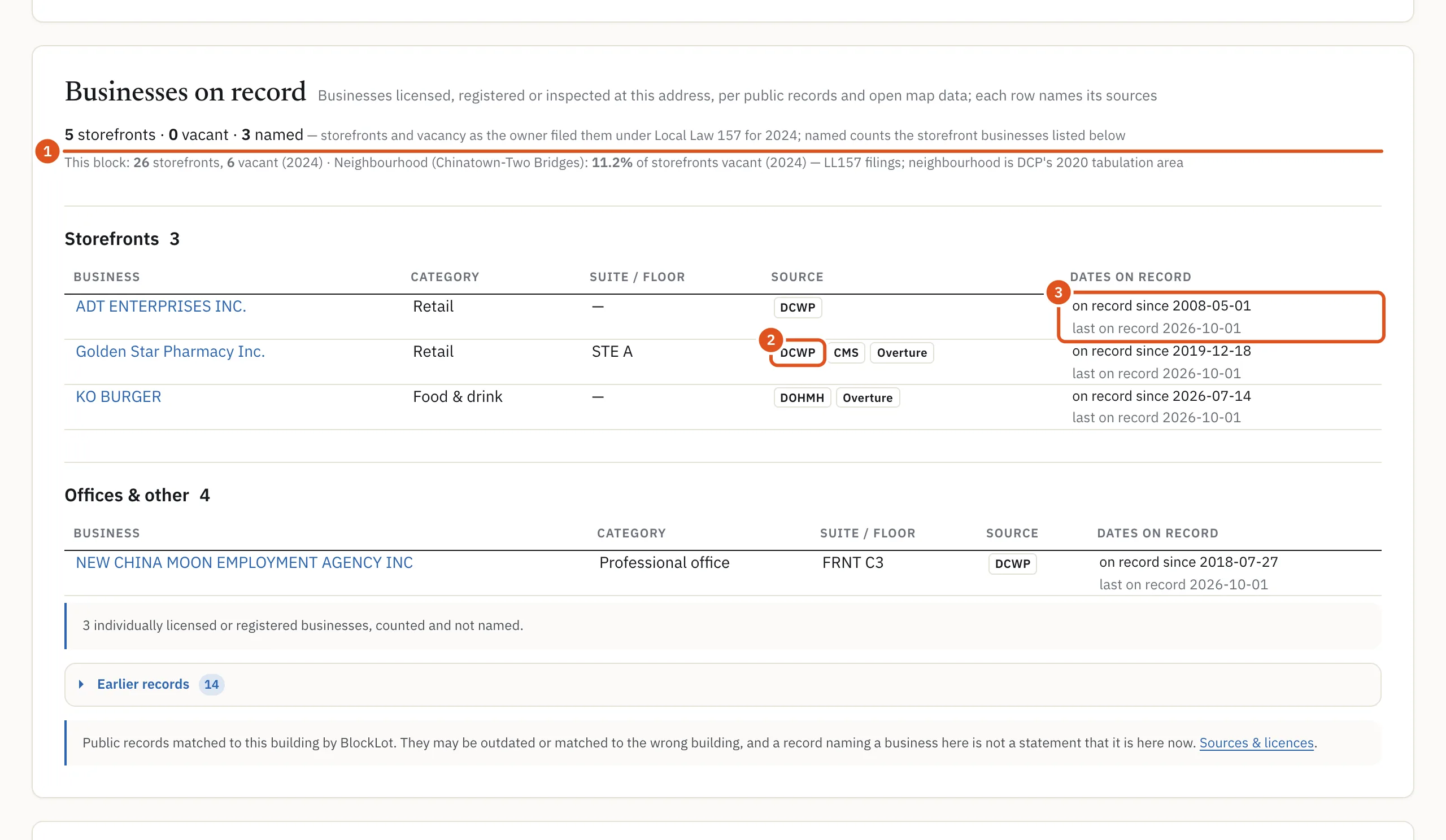
- Storefronts, vacancy, named
- Where the record comes from
- On record since, last on record
Storefront history
Owners of ground- and second-floor storefronts file a yearly registration with DOF under Local Law 157. This card shows each reporting year as filed: storefronts, vacant, and the vacancy rate, with a small line chart of the rate over time. A dash means vacancy was not reported that year.
Counts change with what the owner registered, as when a storefront is merged, split or left off a filing, so a change from one year to the next is not by itself an opening or a closing.
Lease expirations
The card's subtitle says it plainly: Reported lease end dates — not a statement that a lease ends. Leases are renewed, extended and ended early without any filing.
- Storefront leases come from the same Local Law 157 filings. Signed in, you see one row per storefront: the Reported expiry, whether the storefront was occupied or vacant on December 31 of the filing year, and the unit when filed. The filing names no tenant. Only future dates are shown.
- Office leases come from lease end dates tenants reported to DOF for the commercial rent abatement programs. Each lease is a row with the tenant, the reported lease end, when the lease began and the leased area. A tenant who is a private individual is shown as "Private individual — name not shown".
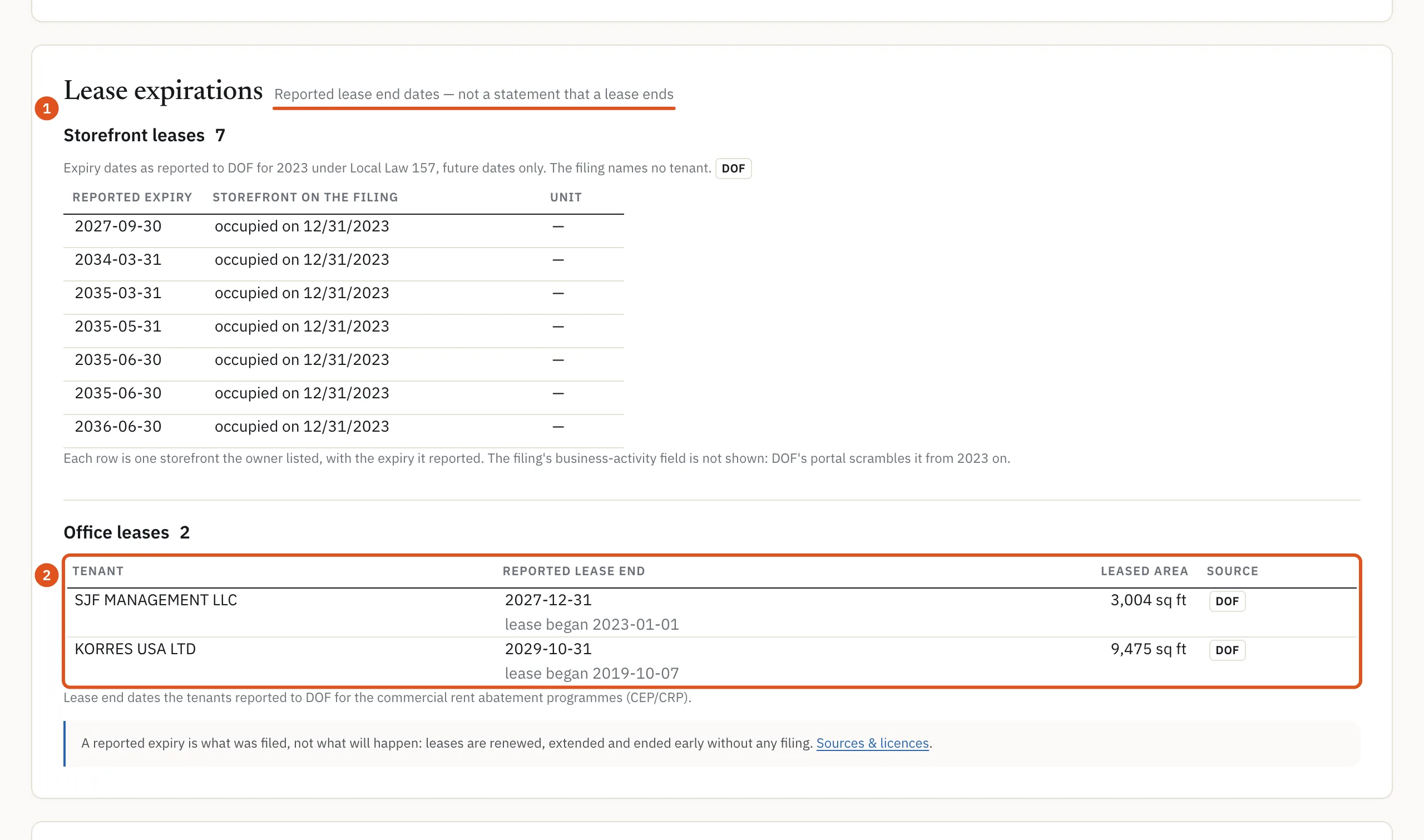
- Reported, not promised
- One row per office lease
To hear about a building's leases as they come due, press Watch at the top of the page, if your plan includes watches. A watch that follows leases e-mails you when a reported expiry is 12, 6 and 3 months away. See Watching leases. To search leases across the city, use the Leases expiring tab of commercial search.
Recorded leases
Some leases are recorded with the City Register in ACRIS, usually as a memorandum of lease. When a building has any, the Businesses on record card has a link such as 3 recorded lease documents →, and the Records card has a Recorded leases button under Occupants.
The drawer lists each document, newest first: the date recorded, the kind of document (memorandum of lease, lease, assignment, termination or subordination), the lessee, the lessee type, the other lots it covers, and either "termination recorded" with a date or "no termination on record". The document number opens the recorded document on ACRIS. A subordination of lease is usually a lender's document, so its second party is shown as "(party 2)".
A recorded lease is a dated document, not a statement that the lease is still running.
Who sees what
Visitors who are not signed in and free accounts see the counts on these cards but no business names, no lease rows and no recorded leases. With a plan, opening the building's full report counts once against your monthly allowance and shows the rows. Depending on your plan, business names may be hidden while the rows, categories and dates stay. See Accounts and plans.