Sales history, timeline and changes
Every sale of the building, everything that happened to it on one time axis, and what BlockLot has seen change lately.
Three cards on the property page answer "what has happened here": Sales history lists every recorded sale, the Timeline puts the building's whole record on one axis, and Changes shows what BlockLot has seen move lately.
Sales history
The card lists every recorded sale of this building, newest first: the date, the price, the buyer, the seller and the source. The first ten rows show; Show all sales opens the rest.
Each row is a deed recorded in ACRIS, the City Register's system for deeds and mortgages, and the Department of Finance's own sales record (DOF) is folded in:
- DOF agrees means DOF shows a sale on the same date for the same price.
- DOF record is a sale DOF lists with no matching deed. Co-ops sell shares and never get a deed, so for a co-op these rows are its whole sales history. ACRIS does not cover Staten Island, so there DOF's record is the only source.
- A greyed row stated no market price: none at all, or a nominal amount under $10,000, as family transfers and LLC reshuffles often are.
- +N lots outside this building means the deed also conveyed other property, so its price covers the whole deed, not this building.
- N lots share this price means DOF shows the same price on several lots that day: usually a package deal.
- foreclosure sale (referee's deed) marks a deed whose seller is a court-appointed referee, which is how a court-ordered foreclosure sale is recorded.
For a condominium, the card covers every unit of the building, with a Unit column. On a unit's own page, that unit's sales are in bold.
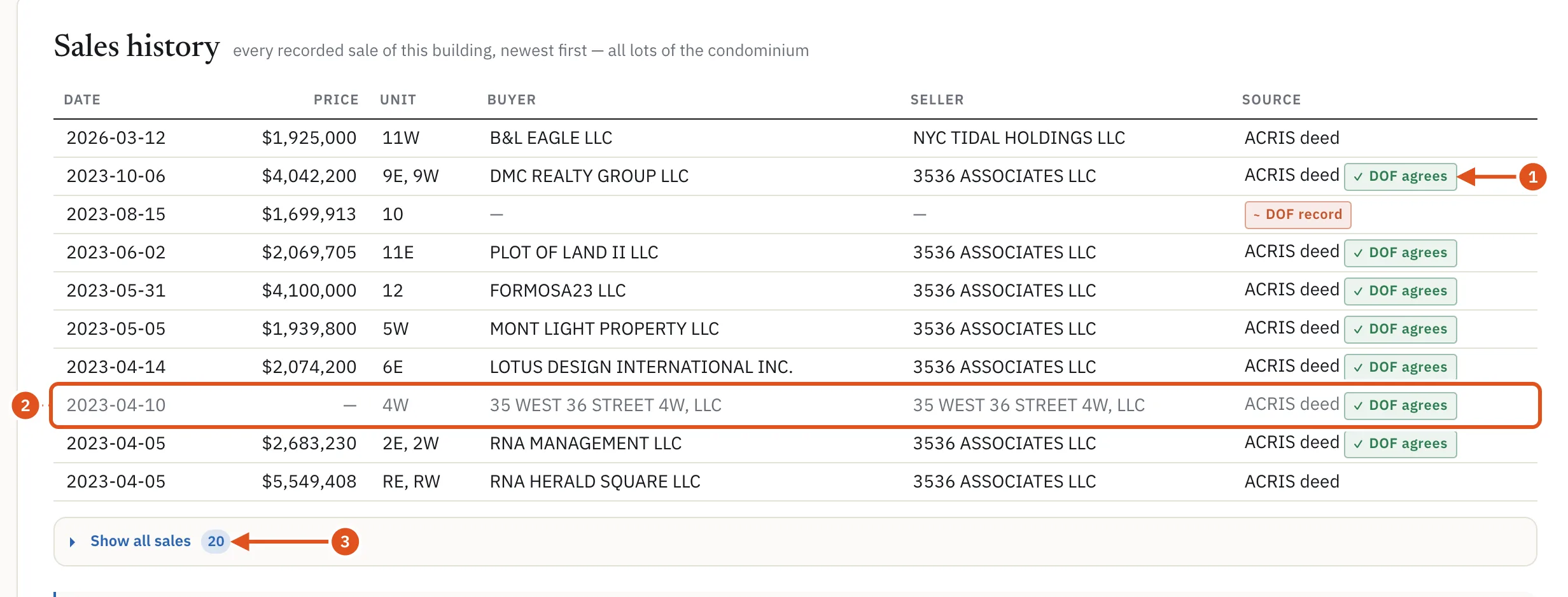
- DOF confirms date and price
- No market price stated
- Older sales
Sales of several buildings at once
When a deed conveyed this building together with other buildings, the Last sold line on the Owner card says so, with a conveyed together chip: one deed conveyed several buildings, for one price in total, and no part of that price belongs to this building. A separate Likely conveyed together line, marked inferred, appears when several deeds were recorded the same day between the same seller and buyer. That is BlockLot's reading of the record, and many such groups are restructurings, such as an owner moving buildings into their own LLC, rather than trades. The owner and contacts article covers the Owner card.
The Timeline
The Timeline puts the building's record on one axis, newest year first. The legend at the top names the kinds of event this building has, such as Deed, Mortgage / lien, Permit, Violation, 311 complaint, Housing court, Eviction and Vacate order, each with its count. Click a kind to hide it, and click it again to bring it back.
Above the list, the activity chart stacks one color per kind of event for each period. Switch between Quarter, Year and Month beside Bars per. Hover a bar for its counts, or click it to jump the list to that period. The chart counts the whole record; the list shows the most recent events.
When you read it:
- Same-day events of one kind fold into one row with a count, and a folded row shows no amount: two mortgages recorded on one day are usually one consolidation, not two debts.
- A still open pill on a row counts the events in it that are still open.
- On a very busy building the list is a sample of the most recent events, and a note says how many it shows. Records with no date are counted in the legend as undated rather than dropped.
- Every row opens the full table it came from, so you can read the record behind it.
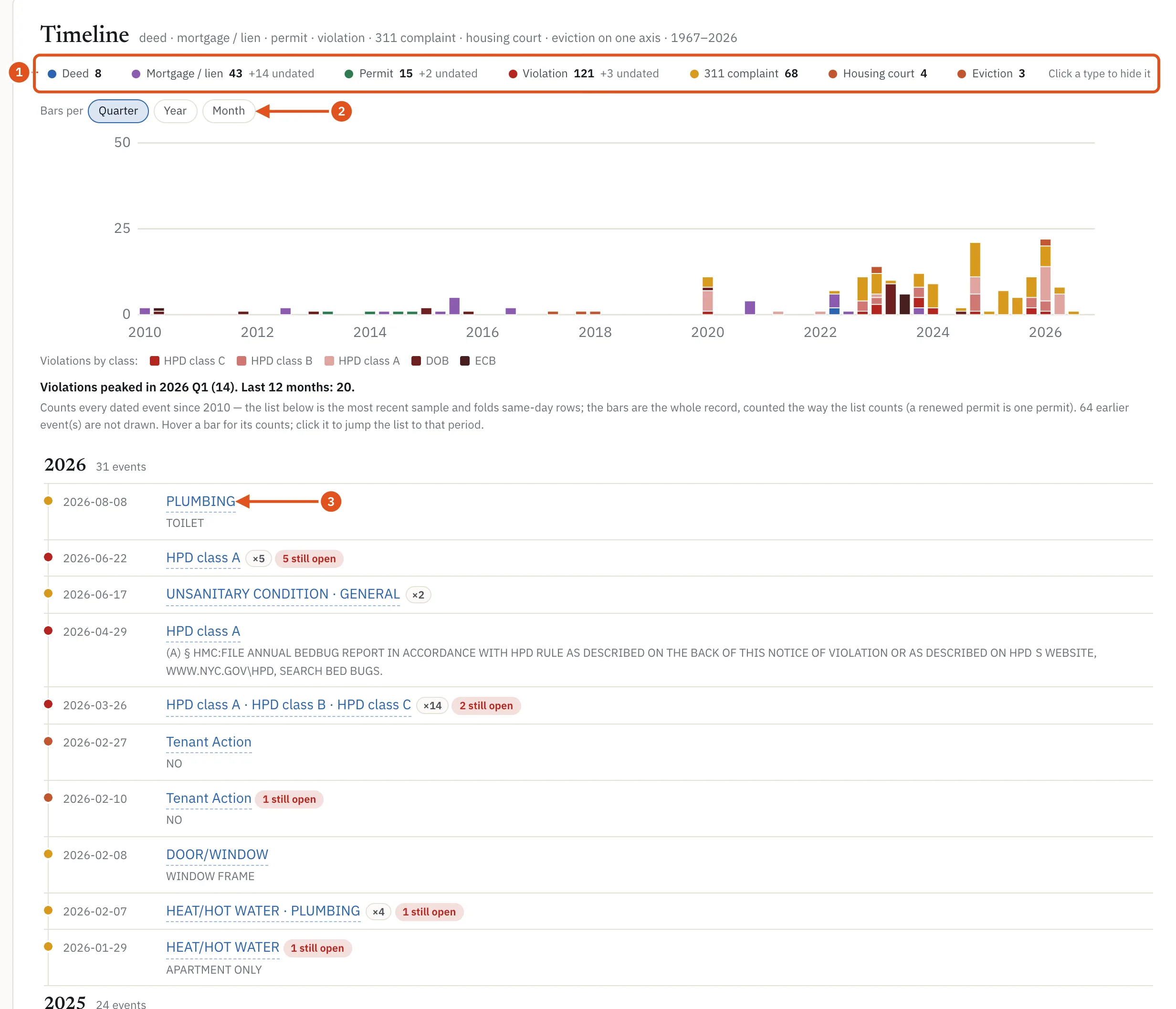
- Click a kind to hide it
- Change the period
- Opens the records behind it
Changes
The Changes card lists what BlockLot has seen change at this building, newest first, dated by when BlockLot observed it, with the source's own date beside it where there is one. The Timeline, by contrast, is dated by the source and goes back decades. The card appears only where something has changed since BlockLot started watching.
The note under the card says when BlockLot began observing each kind of record (Observed by BlockLot since). Anything earlier is in the Timeline. Identical changes on the same day are shown once with a count.
Row history in the drawers
When you open a set of records from the page, a row that has changed since BlockLot began watching it carries a line such as 2 changes recorded. Click it to see each change, with the date BlockLot saw it and what moved from what to what. See Records and drawers.
Who sees what
Visitors who are not signed in see sale dates with prices hidden, and the Timeline and Changes cards with their details and counts hidden and no activity chart. Free accounts see the same public view. With a plan, opening a building's full report counts once against your monthly allowance and shows everything above. See Accounts and plans.