Tutorials · Help and corrections
Corrections, feedback and support
Report an error in a record, ask for information to be removed, send feedback, find the right address to write to, and read the Terms and Privacy Policy.
Every page of BlockLot ends with a footer that links to the places in this article: Terms, Privacy, Sources & licences, Corrections, Feedback, Tutorials and Support. Use them to fix a record, tell us what you think, or reach a person.
Reporting an error in a record
BlockLot republishes public records, so most errors fall into one of two kinds, and they are fixed in different places:
- BlockLot shows something different from the government record. Tell us and we will check the source and correct our copy.
- The government record itself is wrong. It has to be corrected with the agency that keeps it, such as the Department of Finance or the Buildings Department. BlockLot cannot change the City's record, but once the agency does, our copy follows on its next refresh.
To report an error:
- Click Corrections in the footer.
- Under Send a request, choose A correction.
- Enter the property — an address, or the BBL (the borough-block-lot number that identifies a tax lot) if you have it.
- Say what BlockLot shows, what the government record says, and where you saw it. The page address is enough.
- Choose Your connection to the record, enter your name and an e-mail address you read, and click Send request.
BlockLot shows Request received with a reference for your request, and replies by e-mail if it needs more. You can also write to corrections@blocklot.ai; both reach the same person. You do not need an account to use the form.
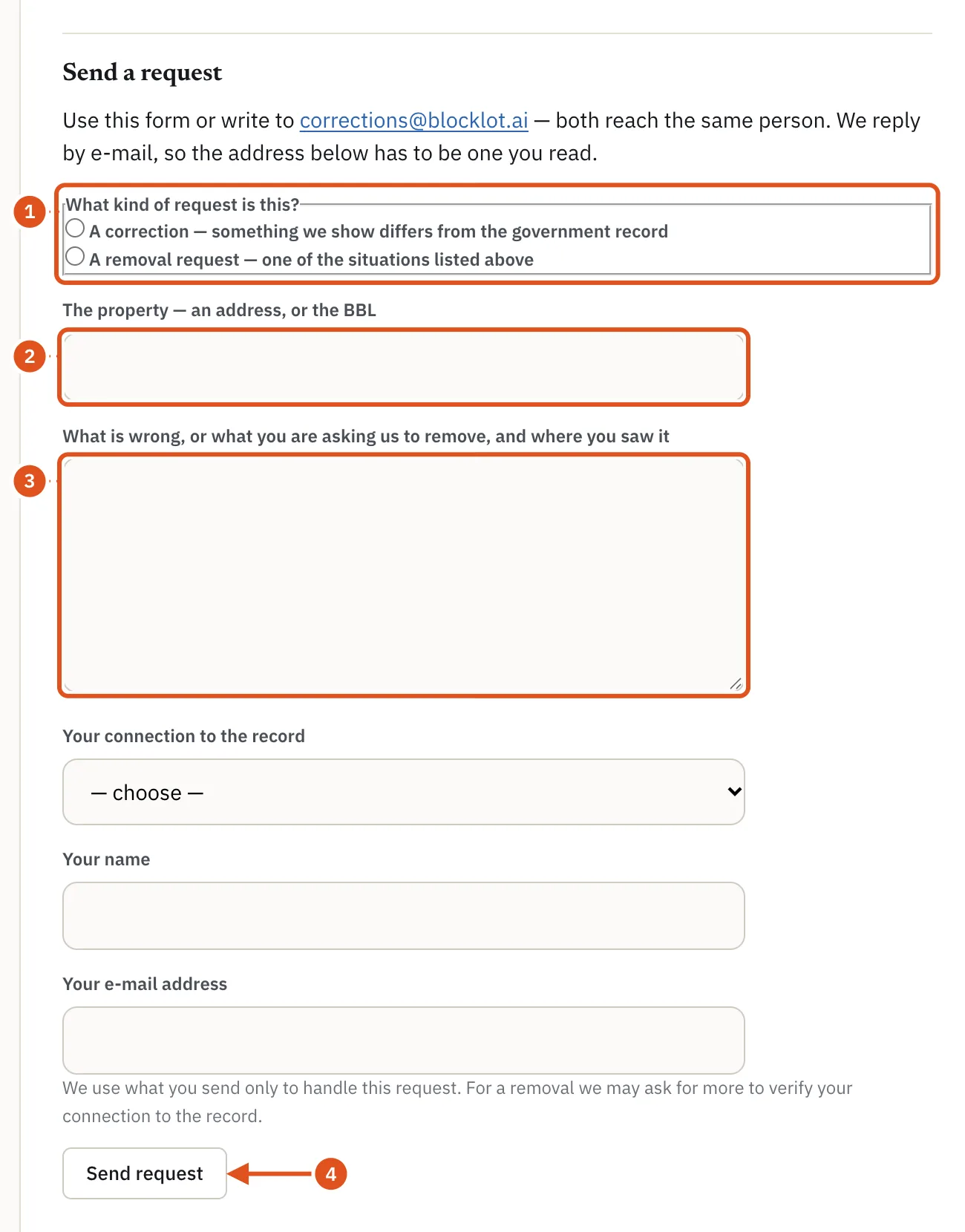
- What kind of request
- The property
- What is wrong
- Sends it to BlockLot
Asking for information to be removed
BlockLot generally does not remove accurate public records: they stay public at the source whether or not we show them. We do review and act on requests from:
- participants in address-confidentiality programs, including New York's;
- people with a credible safety concern, such as a protection order or documented stalking or domestic-violence risk;
- judges, law-enforcement officers and others protected by specific laws;
- anyone whose information appears because of an error of ours.
Use the same form and choose A removal request, or write to corrections@blocklot.ai. Include enough for us to verify your connection to the record. We respond to removal requests within 10 business days, by e-mail.
Sending feedback
An idea, something broken, a question or something you like: it all goes straight to the people building BlockLot.
When you are signed in, click Feedback in the footer. Choose what it is under What is it? — A suggestion, Something is broken or wrong, A question, Something you like, A complaint or Something else — write your message, and click Send feedback. The form notes the page you came from, so you do not need to describe where you were. We reply to your account's e-mail address if we need more.
When you are not signed in, the Feedback link opens an e-mail to feedback@blocklot.ai.
For an opinion on one of the three designs, use Tell us what you think of this design at the bottom of the design menu in the header. See Choosing a look.
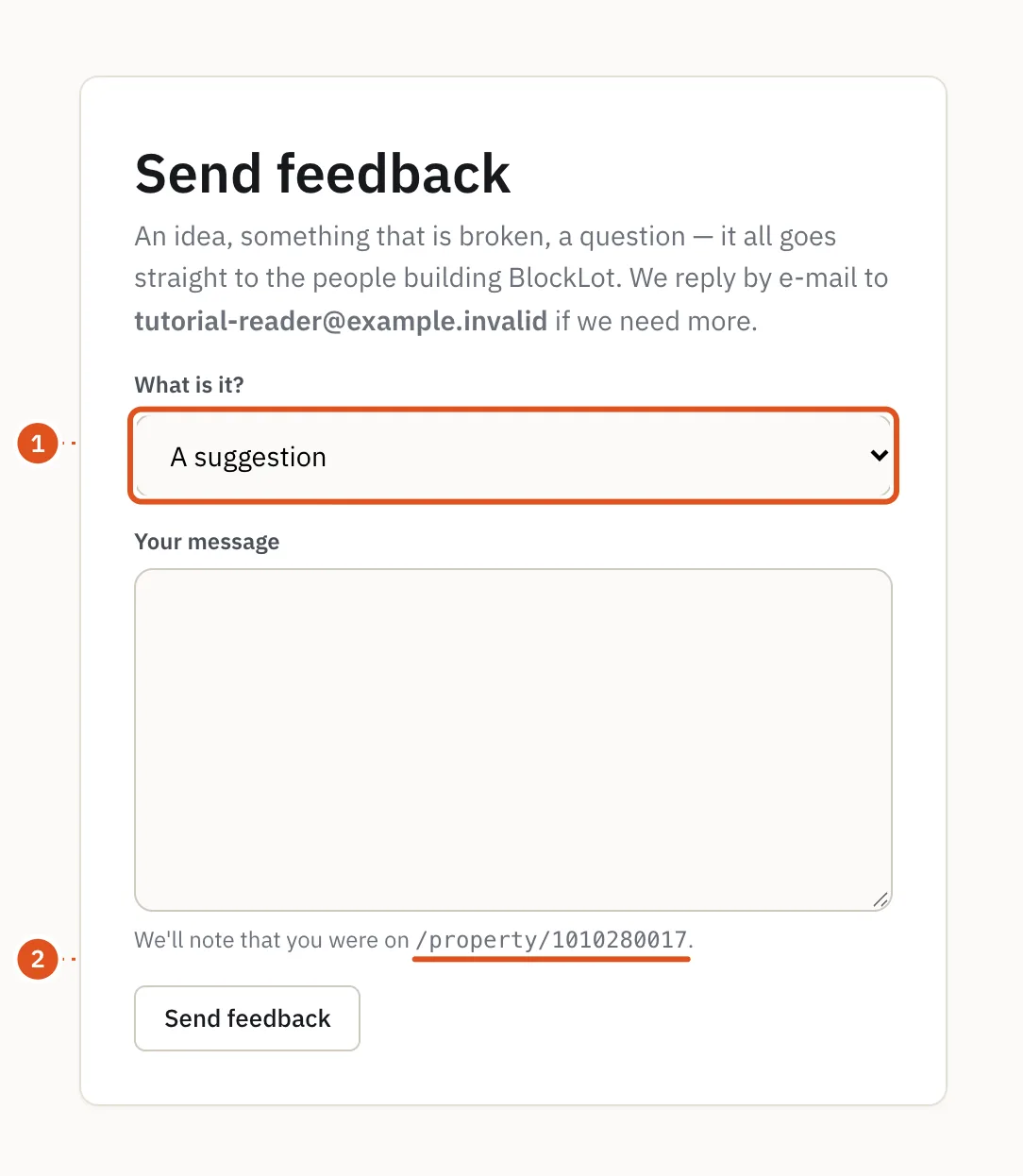
- Kind of feedback
- Where you came from
Support and who to write to
The Support page lists the address for each kind of question. A person reads every message.
- support@blocklot.ai — anything else, or if you are not sure where to write.
- billing@blocklot.ai — billing, plans, refunds and company accounts.
- feedback@blocklot.ai — product questions and feedback.
- data@blocklot.ai — questions about the data: coverage, sources and how a figure is worked out.
- legal@blocklot.ai — legal and privacy.
- corrections@blocklot.ai, or the Corrections page — an error in a record or a removal request.
The Support page also summarizes how plans renew, how to cancel and the refund policy; Plans and billing covers the same ground in more detail. For where the data comes from, see Sources & licences.
Terms of Service and Privacy Policy
The Terms and Privacy links in the footer open the Terms of Service and the Privacy Policy. You agree to the Terms when you create an account. Among other things they prohibit automated collection of data from BlockLot.
When either document changes, signed-in readers see a notice at the top of every page. A change to the Privacy Policy carries a Got it button to dismiss it. A change to the Terms is announced ahead of the date it takes effect, with a link to read the new version, and you are asked to accept the new Terms once they take effect.