Deal search
Filter every tax lot in the city, a borough, a ZIP code or a smaller area by building, value, motivation, occupancy and activity.
Deal search looks at every tax lot in the area you choose and keeps the ones that match your filters: a corner lot built to under half of what zoning allows, a mixed-use building nobody has sold in decades, a retail building with a lien and a vacant storefront. Each match is a lot worth a look, not a building for sale.
Getting there
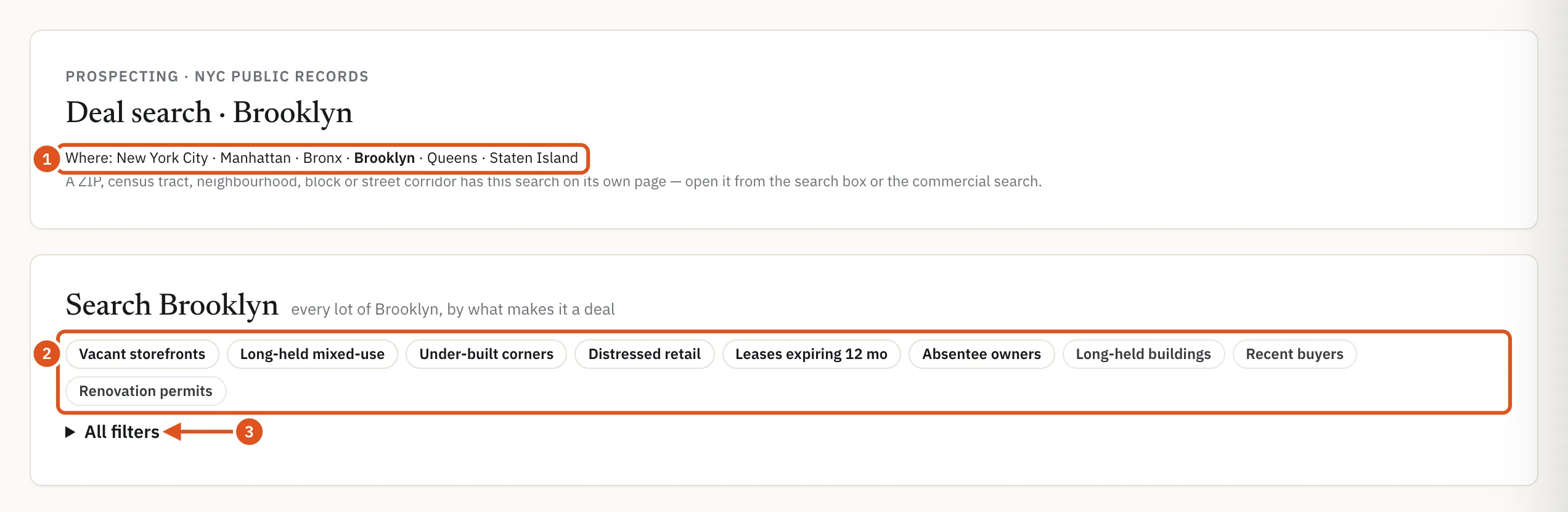
Choose Deal search from the Prospecting menu in the header. The page opens on the whole city. The Where: line under the heading switches between New York City and each of the five boroughs, and keeps your filters when you switch.
For a smaller area, use the same search on that area's own page. Every ZIP code, census tract, neighborhood, tax block, block face and street corridor page carries a section headed Search this ZIP (or Search this block, Search this corridor and so on) that works exactly like this page, limited to that area. Find an area page by typing a ZIP code or a block into the search box; see Searching and ZIP pages.
- Choose the city or a borough
- Ready-made searches
- Every filter
Ready-made searches
The row of buttons at the top, from Vacant storefronts to Renovation permits, runs a common search in one click. Hover over a button for a one-line description. On a ZIP or block page, each button also shows how many lots in that area match. Ready-made deal searches gives the exact rule behind each one.
The filters
Open All filters to build your own search. The filters come in five groups, and every lot must match all of the filters you set:
- Building: Building class (retail, mixed-use, office, residential, industrial and warehouse, and so on), Zoning (commercial, manufacturing or residence district), minimum lot and building size, year built, Corner lot, On a wide street (75 ft+) and minimum frontage.
- Value: Last sale over N years ago, Last $/sq ft below the ZIP median, Unused buildable sq ft ≥, Soft site (built to under half of its largest permitted floor area) and Assemblage candidate (neighboring lots on one tax block that are both under-built or held by one owner group).
- Motivation: Distress band at least, Liens (city tax-lien sale lists or a live federal tax lien against an owner), DOF charges in arrears, Foreclosure activity, Open HPD litigation (cases the Department of Housing Preservation and Development has open against the building), Tax exemption ending within N years, Absentee owner, Owner type and Owner's portfolio ≥ N buildings.
- Occupancy: Vacant storefront (owner's filing), minimum number of storefronts, Leases expiring within 12 or 24 months, Anchor brand present or absent, and whether the lot has, or has no, business of a category.
- Activity: new-building, alteration or demolition permits in the last 12 months, Major alteration permit, 12 months, Open violations ≥, Stalled construction site and Sold in the last 24 months.
Choose a Sort by order and press Search. Clear removes every filter.
A filter that cannot apply is greyed out with its reason rather than quietly ignored: storefront and lease filters when you pick only residential buildings or vacant land, building filters for vacant land, federal liens on Staten Island. If a filter you set was not applied, a line under the form says Not applied and why.

- Distress, liens, owners
- Order of results
- Run the search
Reading the results
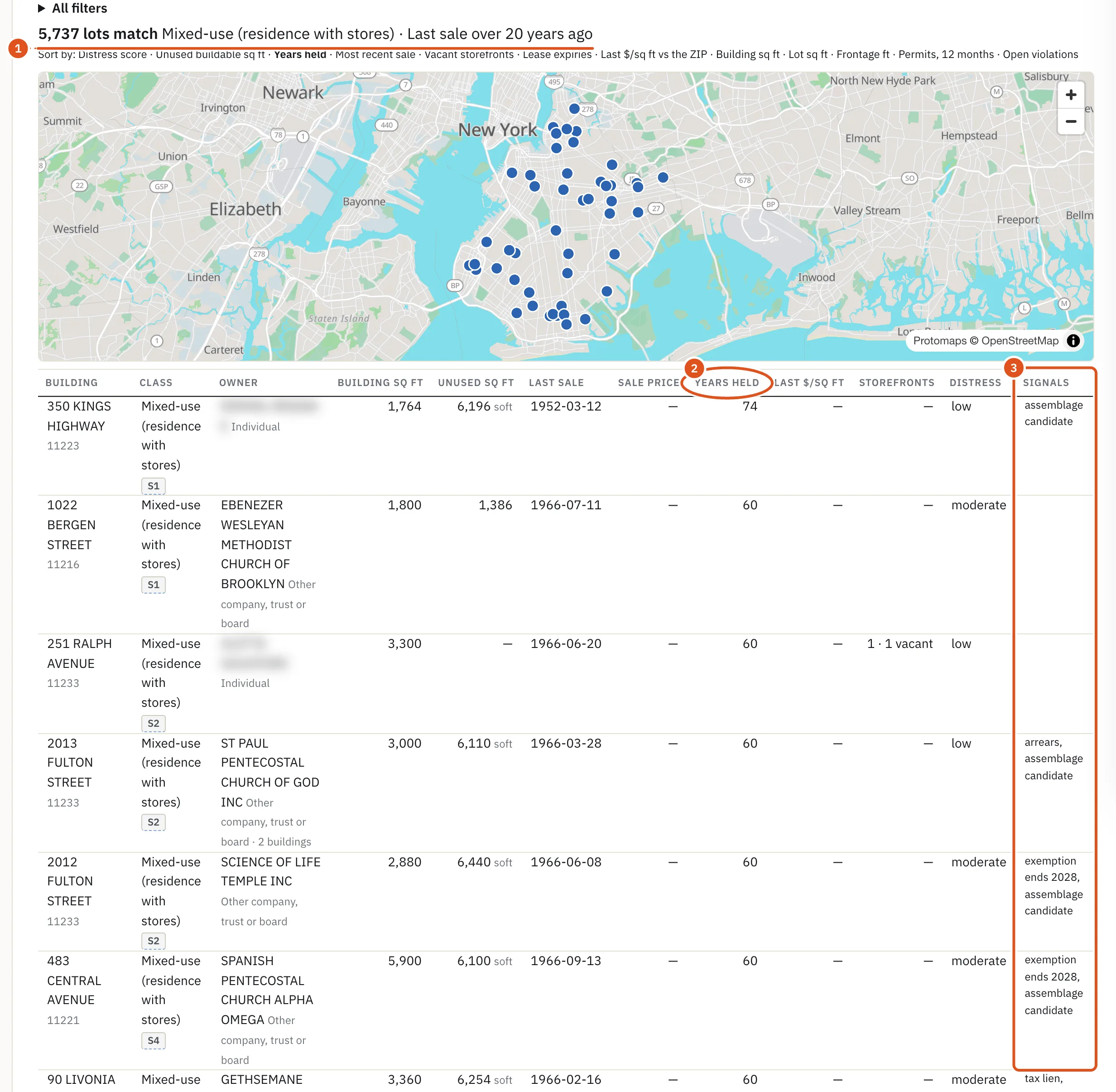
The results start with a count, N lots match, followed by the filters in words. Signed in, with a plan, you then see:
- A map of the lots on the current page. Pointing at a row highlights its dot.
- A table with Building, Class, Owner, Building sq ft, Unused sq ft, Last sale, Sale price, Years held, Last $/sq ft (with the ZIP median beside it), Storefronts, Distress and Signals. Signals lists what applies, such as a tax lien, an absentee owner, an exemption's end year or leases expiring.
- Sort by links above the table, which reorder the whole result, for example by Distress score, Years held, Most recent sale or Unused buildable sq ft. Clicking a column heading sorts only the rows on the current page.
Results come 50 at a time; More and Earlier page through them. The building's address opens its property page, and the owner's name opens the owner's page where BlockLot has one. Owners are named by the same rule as on the property page, which is BlockLot's reading of the deed and tax records, not a fact the City states.
- What matched
- Sortable column
- Why the lot stands out
Who sees what
- Without an account you see the count for any search, and the counts on the ready-made buttons on area pages, but not the lots themselves. The page says A plan shows the buildings.
- Signed in with a plan, each search you run counts as one report against your monthly allowance. A ready-made search and the same filters set by hand are the same search. Sorting, paging and reloading are free, and nothing counts until you set a filter.
- When your allowance is used up, or your plan has no reports, you still see the count, with the note The count is shown; the buildings need a report this period.
The deal search has no download.