Tutorials · Blocks, ZIPs and neighborhoods
ZIP code pages
A whole ZIP code at a glance — its blocks on a map, every block-page figure added up, trends over the years, and its blocks ranked.
A ZIP page is the block page scaled up to a whole ZIP code. It adds up the figures of every tax block in the ZIP, draws the blocks on a map you can color by almost any of them, shows how the area has changed over the years, and ranks its blocks so you can see where to look first. Use it to compare neighborhoods, or to find the blocks inside a ZIP worth a closer look.
Getting there
- From a property page. In the header, the borough and ZIP code under the address are a link to the ZIP page.
- From search. Type a New York City ZIP code. It appears under ZIP codes, with links to the ZIP page and to a commercial search of the ZIP.
Reading the page
The header
The eyebrow reads ZIP · NYC public records, then the title, the borough and the neighborhoods the ZIP overlaps. Each neighborhood name opens its own page. See Census tract and neighborhood pages.
Two links follow: Commercial search in this ZIP → and Rank its block faces and street segments →, both in the commercial search. See Commercial search.
Search this ZIP
A deal search over every lot in the ZIP: ready-made presets, each showing how many lots match, and All filters for your own combination. Results come as a list and as dots on a map. See Deal search and Deal search presets.

- Ready-made searches
- Build your own search
- Open a neighborhood
Map
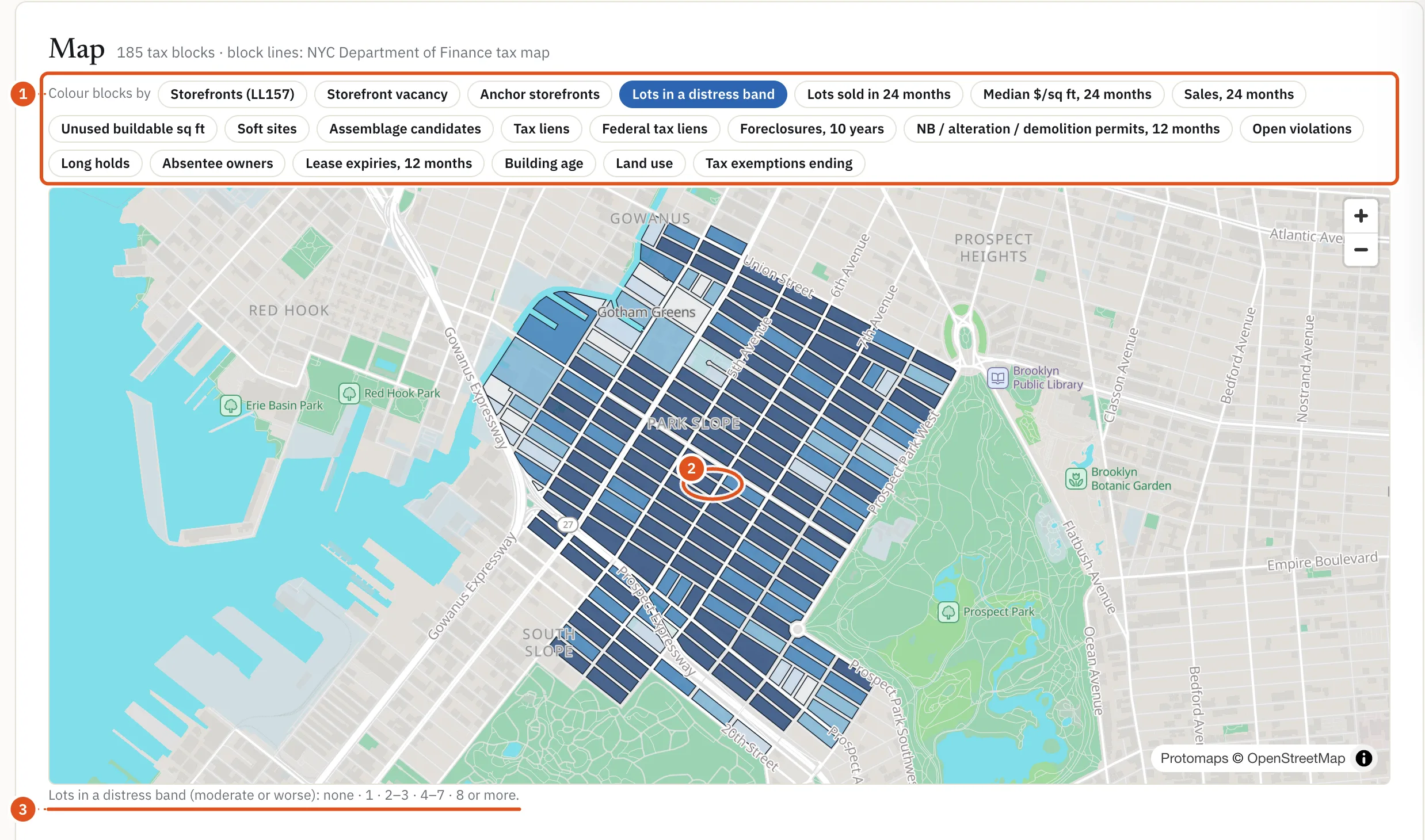
Every tax block in the ZIP, drawn on the City tax map. Colour blocks by switches the layer: storefronts, storefront vacancy, anchor storefronts, lots in a distress band, sales, median price per square foot, unused buildable floor area, soft sites, assemblage candidates, tax and federal liens, foreclosures, permits, open violations, long holds, absentee owners, lease expiries, building age, land use and tax exemptions ending. The legend under the map explains the shades.
Hover a block for its value; click it to open its block page. A block counts in the ZIP that most of its lots carry, so a block on the border appears in one ZIP only.
- Pick a layer
- Click to open it
- What the shades mean
The figures
Five cards hold the ZIP's figures: ZIP in numbers, Sales and ownership, Liens, distress and legal, Construction and development and On the street. Each figure is the sum of the ZIP's blocks, counted by the block page's own rules, and many are compared with the borough and the city. Signed in, click a number to list the lots behind it in the side drawer. Lots held by the largest owner lists that owner's lots with the owner named on each, and Owners (owner groups) lists the owners holding more than one lot in the ZIP, largest first; click an owner's lot count to see its lots.
Trends and mix
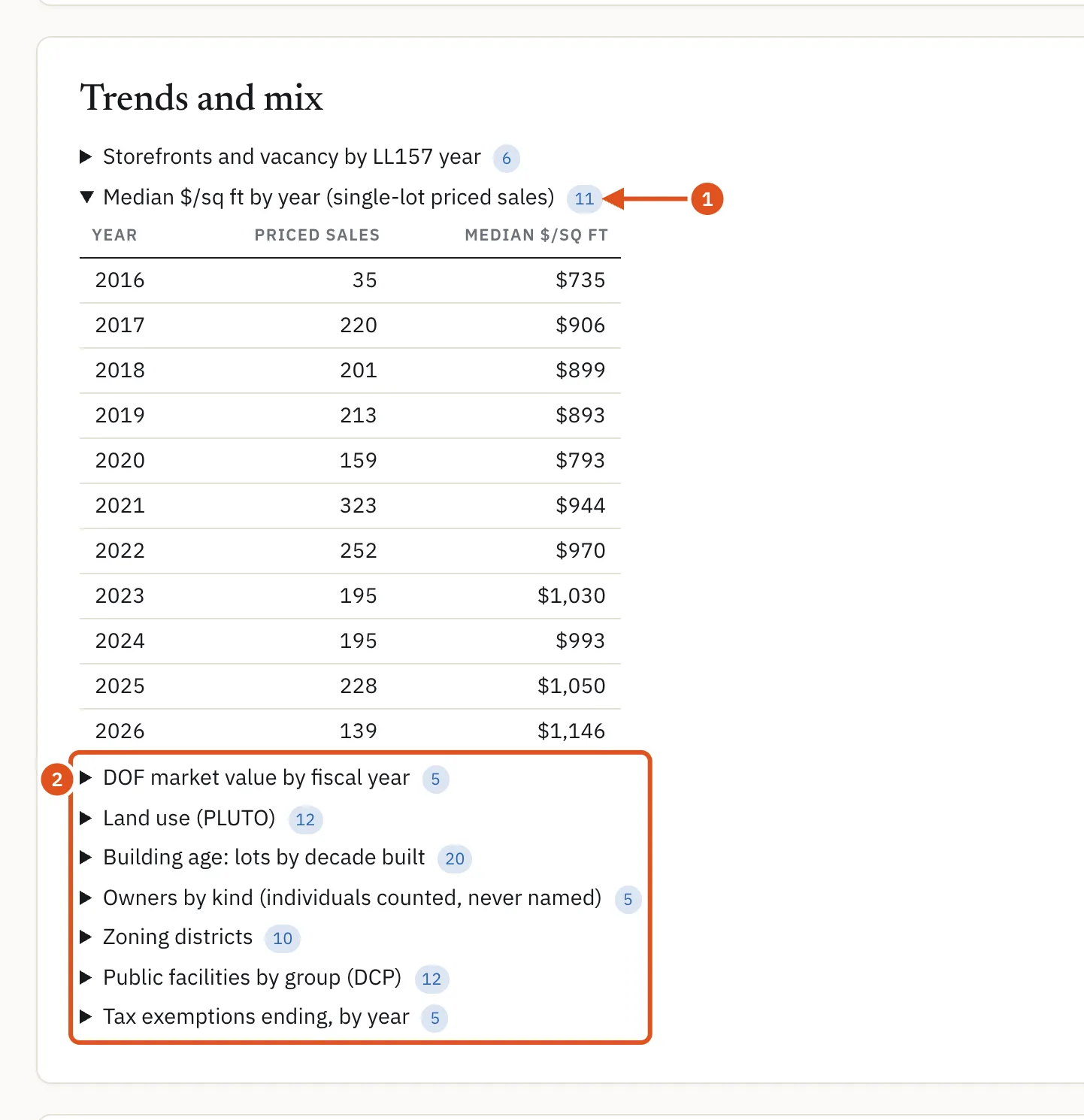
Folded tables, each opening on a click: storefronts and vacancy by year, median price per square foot by year, Department of Finance market value by fiscal year, land use, building age by decade, owners by kind (individuals counted, never named), zoning districts, public facilities and tax exemptions ending by year.
- Opens the yearly table
- More trends and mixes
The tax blocks list
The last card ranks every tax block in the ZIP. Rank by picks the order: storefronts, vacancy rate, anchor share, named storefront businesses, lots in a distress band, lots sold, median price per square foot, sales, unused floor area, soft sites, assemblage lots, liens, foreclosures, permits, open violations, long holds, absentee owners, lease expiries, tax exemptions ending or median year built. Each row shows the block's lots, storefronts, vacancy, distress and sales, its latest sale, and a link to its block page. Click a column heading to sort the page you are on; More loads the next blocks.
What you see without signing in
The ZIP page is public. Without an account, or on a free account, you see the public counts, the map shaded by storefront filings, and the figures that are public record; private figures such as sales, violations and distress are hidden, nothing opens, and the blocks are not ranked. A plan shows the rest.
Opening a ZIP page counts as one report against your monthly allowance; opening it again in the same month does not count again. Running a deal search with a preset or filter counts as its own report. See Plans and billing.
Tips
- For a step-by-step use of this page, see Absentee owners in a ZIP.
- Rank the blocks by the figure you care about, then open the top few block pages and work from their All lots tables. See Block pages and street frontage.