Tutorials · Search and the map
Searching
Find a building by address, apartment, block or ZIP code, and an owner, company or business by name — and what each kind of search costs.
The search box is the way into BlockLot. Type an address and it finds the tax lot; type a company's name and it finds the companies and the buildings they hold. Results are grouped by kind, so you can see at a glance whether you found a building, a block, a ZIP code, an owner or a business.
Getting there
- Signed in, the search box sits in the header of every page. Results appear as you type and update each time you pause, so there is no button to press.
- Not signed in, use the search box on the home page and press Search.
Type at least three characters. Upper and lower case do not matter.
What the box understands
- An address, written the way you would on an envelope: "641 5th ave", "23-11 30th Drive, Queens". Abbreviations and ordinals are matched both ways, so "St" finds "Street" and "5th" finds "5". If you paste a full postal address, BlockLot uses the borough and ZIP code as filters and drops words it cannot use, such as a neighborhood name.
- An apartment, after the address: "641 5th ave #22N". Condominium units are their own tax lots, so the exact unit comes first. A rental apartment is not a tax lot, so searching one finds the building instead.
- A tax block, with its borough: "Queens 1860", "block 1860 queens", "4-1860", or the first six digits of a BBL, the borough-block-lot number that identifies a tax lot.
- A ZIP code: "11103" or "zip 11103".
- An owner, company or business name — for example the name of an LLC or a store. Name searches need an account with a plan; see below.
There is no fuzzy matching: a misspelled street name returns nothing, so check the spelling before you conclude a building is missing.
Reading the results
Results come in groups. Blocks and ZIP codes appear only when your search names one; the other groups appear every time, and say so when nothing matched:
- Owners & entities — companies registered with New York State whose names match, each with its registered office address, the number of buildings it holds, and a chip saying how sure the match is. Click a name to open the company's page, or office ↗ to see everything registered at that office.
- Businesses — businesses found in licence, registration and inspection records, with their category and how many buildings they are linked to. Click one to open its page.
- Blocks — the tax block you named, with its lot count and a link to its street frontage.
- ZIP codes — the ZIP code you named, with a link to its commercial search.
- Properties — matching tax lots, each with its address, the apartment where it has one, its BBL and its building class. Click the address to open the property page.

- Companies that match
- How sure the match is
- Matching tax lots
When BlockLot searched something other than exactly what you typed, a line at the top says so, for example Searched "641 5 AVE" in Manhattan, followed by what it ignored. If you searched an apartment that has no tax lot of its own, the line says No lot matched apartment … and shows the building instead.
If BlockLot's own address index cannot match an address as typed, it asks the City's geocoder, the official service that turns an address into a tax lot. The lots it places are marked geocoded, and a note above the results says so. An address that exists in more than one borough, like a common street number on Broadway, can return one lot in each.
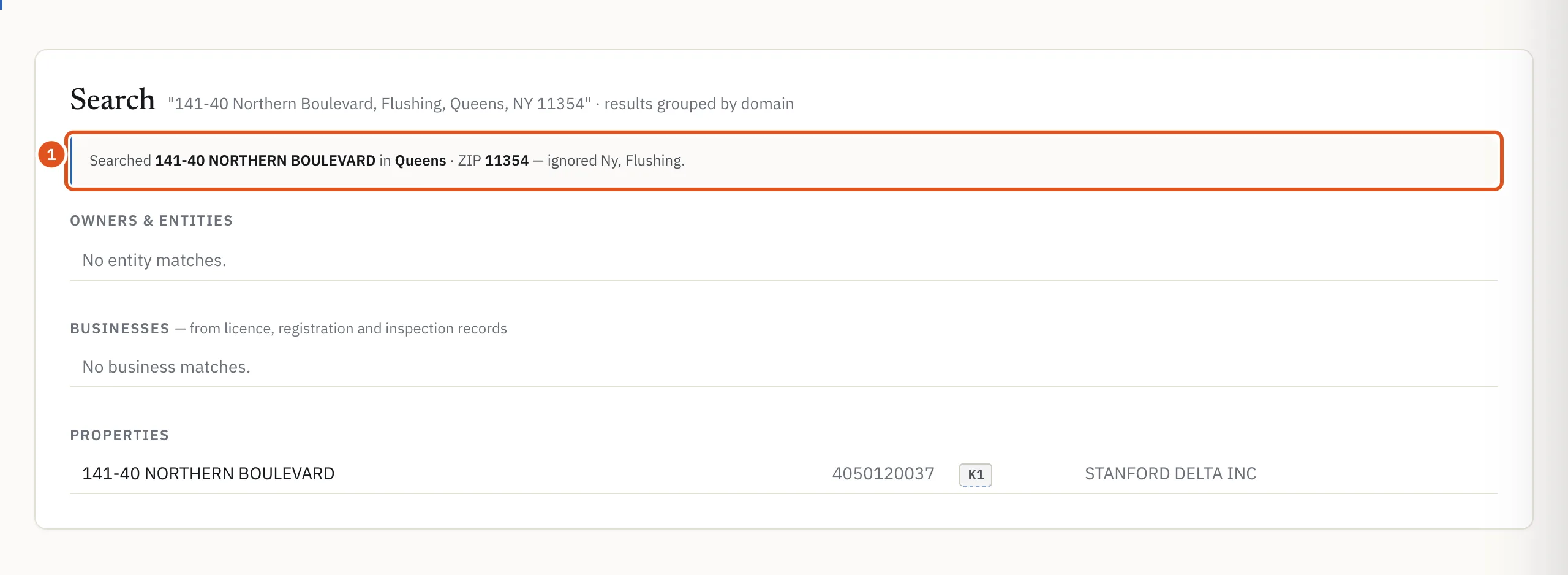
- What BlockLot searched, and what it dropped
What a search costs
Searching by address, block or ZIP code is free and never uses your monthly allowance of reports. Opening a property page from the results is what counts as a report, and opening the same building again in the same period is free.
A name search that returns owners, companies or businesses does not use your monthly allowance either, but it is recorded in your history and is subject to hourly and daily limits that stop bulk copying. If you reach one, the address results still appear and the name groups are left out until the limit resets.
If you are not signed in
Without an account, search finds buildings, blocks and ZIP codes. It does not search owner, company or business names, and it does not show who owns a building. If what you typed looks like a name, the results say Sign in to search by owner.
A free account searches the same way. Name search, and the owner groups in the results, come with a plan: see Accounts and plans.
Tips
- Start with the house number and street. Add the borough only if the first results are in the wrong one.
- For a condominium, search the building first to see every unit, each labeled with its apartment.
- An LLC is often named after its building's address. A name search for an address can therefore return the LLC that owns it, alongside the building itself.
- To find out who owns a building, open its property page. The recipe for finding a building's owner walks through it.