Distressed buildings
A citywide list of buildings ranked by distress score, with the recorded liens, foreclosure sales and other filings behind each one.
The Distressed buildings list brings together buildings whose public record shows financial strain: city or federal tax liens, charges long overdue, a foreclosure sale, a lien from the building's own condo board. Each signal is a recorded document or listing with its date. It is a lead to check, not a prediction about the building or its owner.
Getting there
Choose Distressed buildings from the Prospecting menu in the header. The page is headed Distressed & pre-foreclosure buildings, followed by the place you are looking at, New York City until you narrow it.
What puts a building on the list
A building appears if BlockLot's distress score for it is above zero, or if it carries at least one of the signals below. The distress score runs from 0 to 100 and adds up weighted signals from the public record; the property page shows how each building's score is built (see Distress and liens). Scores fall into bands: moderate, elevated and severe.
The signals you can filter on are:
- Federal tax lien against an owner: a live federal tax lien that names a current owner of the building at this address.
- City tax lien sold, no discharge recorded: the City sold a tax lien on the property and no discharge is on record.
- On the tax-lien sale list (latest notices, or a lien sold): the property was on the City's notices of an upcoming lien sale for overdue charges, or a lien was sold.
- Condo common-charge lien, not terminated: a condominium board recorded a lien for unpaid common charges, and no termination is recorded.
- Reverse mortgage assigned to HUD: a reverse mortgage was assigned to the federal Department of Housing and Urban Development, and no satisfaction is recorded since.
- OATH judgments, $10,000+ owed: unpaid penalties from the City's administrative court (OATH) docketed as judgments, totaling at least $10,000.
- DOF charges overdue 2+ years ($1,000+): Department of Finance charges of $1,000 or more, the oldest unpaid for over two years.
- Foreclosure sale in the last 24 months: a court-ordered foreclosure sale (a referee's deed) or a City tax foreclosure.
- Estate / executor sale in the last 24 months: a sale by an estate or its executor.
- Transfer-on-death deed: a deed naming who receives the property when the owner dies, not revoked.
Filters
The form at the top narrows the list. Choose a Borough, type a ZIP, set Distress at least to a band, and give a range of residential units with Units from and to. Under Building type, tick any of the kinds listed, from 1–2 family homes and Walk-up apartments to Commercial & other. Under Signals, tick the signals you want and choose whether a building needs any of them or all of them. Sort orders the list by Distress score or by Most pre-foreclosure signals. Press Show.
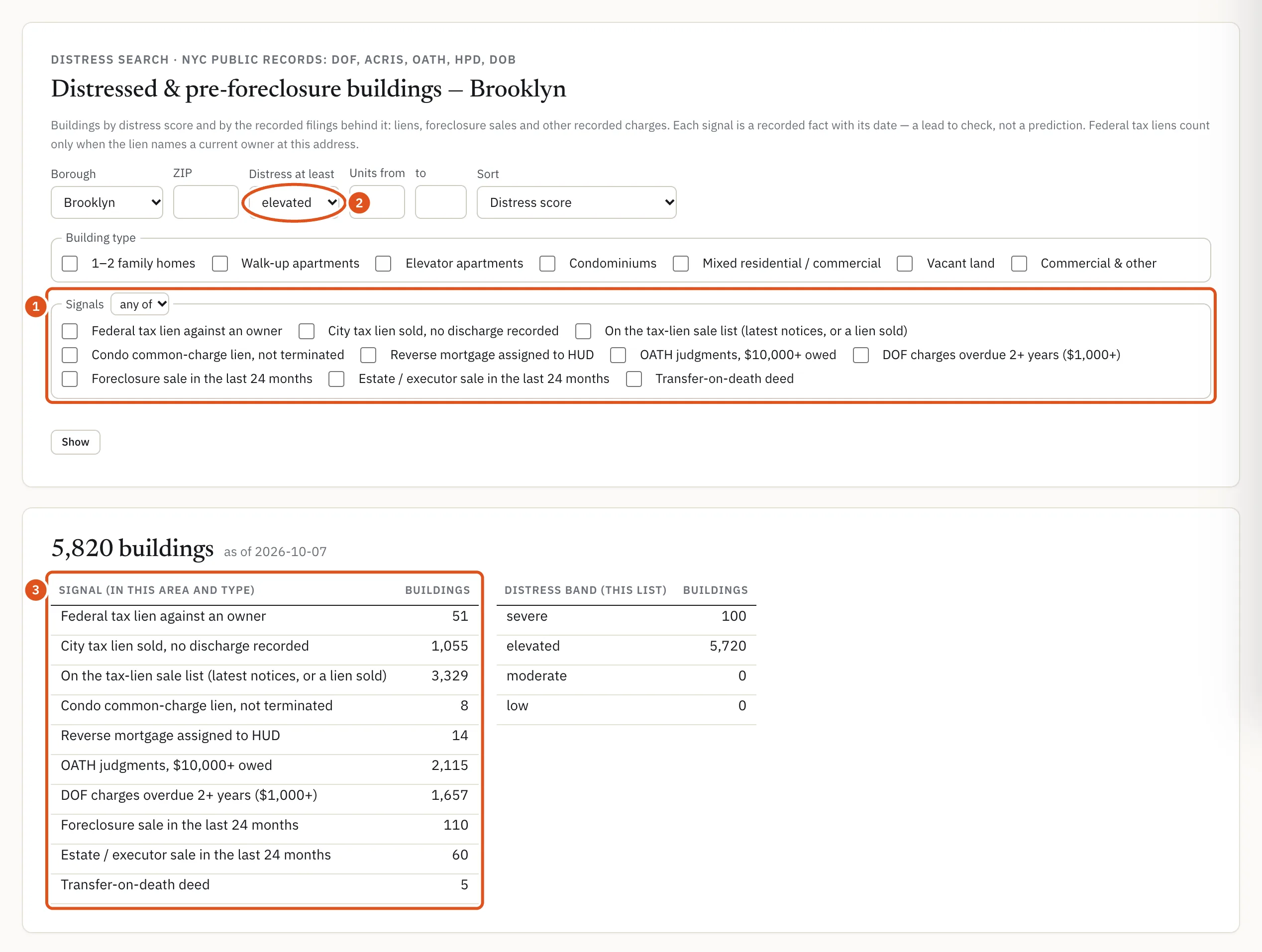
- Pick the signals
- Minimum band
- How many have each
Reading the list
Under the form, a counts card gives the number of buildings that match, the date the list was built, how many buildings in your area and building types carry each signal, and how many fall in each band. A signal whose source is not loaded says source not loaded on this server, so a zero there means "unknown", never "clear".
Signed in with a plan, the list itself follows. Each row gives the Building (address, ZIP, borough and BBL, the borough-block-lot number that identifies a tax lot), its Type, Units, Score with its band, and Signals on record, each written as a record with its date: a condo common-charge lien, for example, shows the date it was recorded and the words "no termination recorded". Rows come 50 at a time, with ← Previous and Next →. The address opens the building's page, where the distress card shows the score's breakdown.
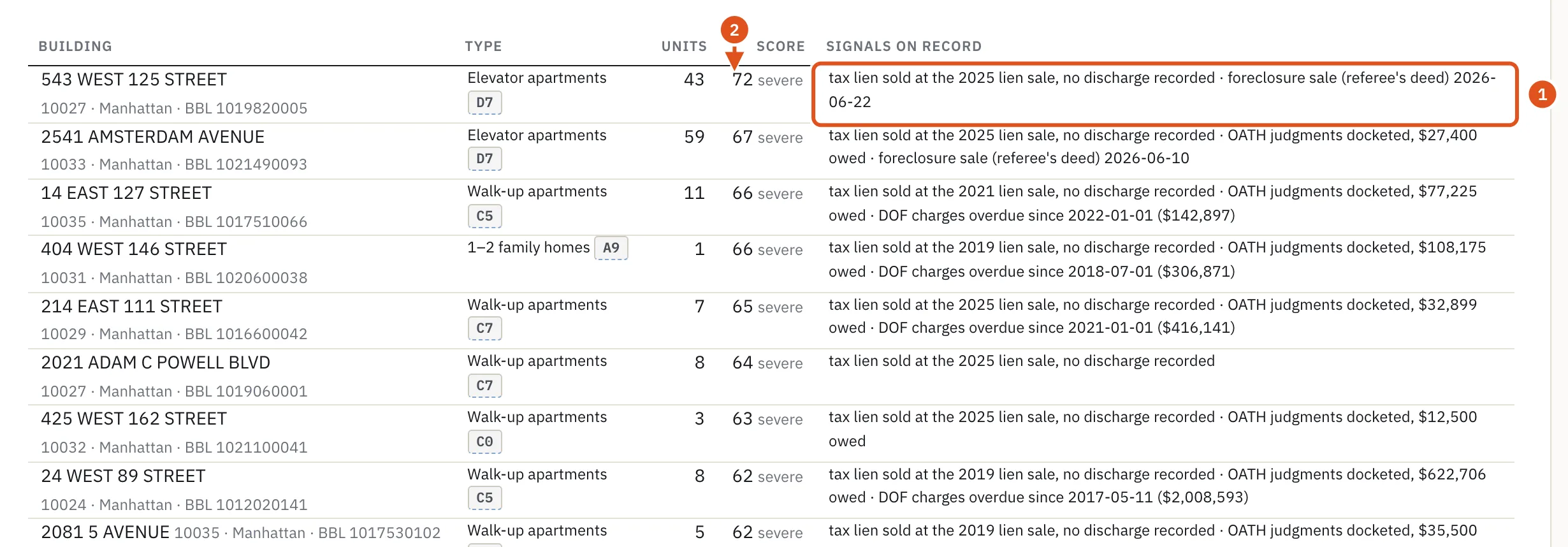
- The records, with dates
- Score and band
Foreclosure sales on the property page
A completed foreclosure sale also shows on the building itself. In the sales history on the property page, a deed whose seller is a court-appointed referee carries the tag foreclosure sale (referee's deed). The buyer, often the lender that foreclosed, owns the property after it. See History.
Who sees what
- Without an account you see the counts: how many buildings match, how many carry each signal and how many fall in each band. Addresses are not shown.
- Signed in with a plan, you see the buildings. Each distinct set of filters counts as one report against your monthly allowance; paging and reloading are free. When your allowance is used up, the page shows the counts only.
Tips
- To see only the strongest cases, tick several signals and choose all of.
- Every signal is a public filing about a property, and some concern people in hard circumstances. Use the list to research and verify, and approach owners with care.
- To combine liens, arrears and foreclosure activity with building size, owner type or storefront data, use the Deal search and its Motivation filters.