Find buildings with distress signals
List the buildings in an area with liens, overdue charges and open violations on record, then check each signal on the building's page.
"Which buildings in this neighborhood have liens or unpaid charges piling up?" Buildings carrying tax liens, overdue City charges or a long list of open violations are often ones whose owners are under pressure to sell, refinance or bring in new management. This recipe finds them in an area and then checks what the record actually says about each one.
Every item here is a signal: a dated public record, such as a lien recorded on a certain day with no release recorded since. None of it is a judgement about the owner or a prediction that a building will be sold.
Before you start
Anyone can see how many buildings match. To see the buildings themselves you need to be signed in on a plan; see plans. Each distinct search counts once against your monthly allowance of reports, and paging through it does not. Opening a building counts as a report.
1. Open the distress search
Open the Prospecting menu at the top of any page and choose Distressed buildings. More in Distressed buildings.
2. Set the area and the signals
In the form at the top:
- Pick a Borough, or type a five-digit ZIP.
- Choose Distress at least: moderate, elevated or severe.
- Tick the Building type you work with, and narrow the size with Units from and to.
- Under Signals, tick the records you care about, such as City tax lien sold, no discharge recorded, DOF charges overdue 2+ years ($1,000+) or Federal tax lien against an owner. Choose any of or all of to combine them.
- Choose Sort: Distress score, or Most pre-foreclosure signals. Press Show.

- Which records to match
- Combine signals
- Buildings per signal
3. Read the list
The counts card shows how many buildings in your area and building type carry each signal, and how many fall in each distress band. Below it, each row gives the building, its type, Units, its Score and band, and the Signals on record, each with its date. Use Next → to page through.
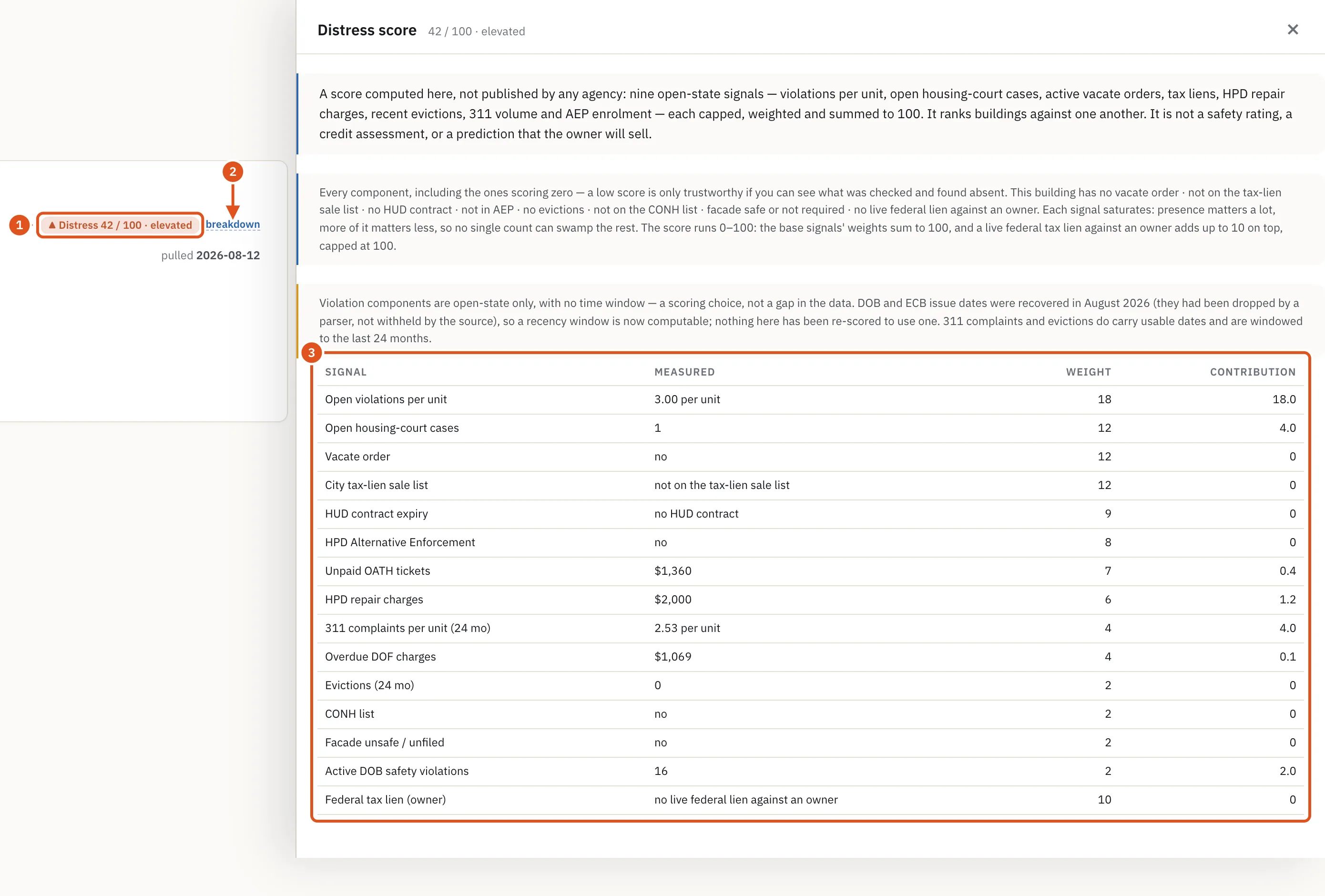
The score is BlockLot's own 0–100 summary of the record. It adds up components such as open violations per unit, open housing-court cases, a vacate order, a place on the City's tax-lien sale list, unpaid OATH tickets (penalties from the City's administrative court) and overdue charges owed to the Department of Finance. It does not say why a building has them.
4. Open the building and see what the score is made of
Click an address. At the top right of the property page, the score reads Distress N / 100 with its band. Click it (it is marked breakdown) to open the Distress score drawer, which lists every component that goes into it, including the ones that scored zero. A Why: line at the foot of the top card summarizes the main reasons. See Distress and liens.
- The score and band
- Open the components
- What it adds up
5. Check each signal on the building's page
Two cards lower down hold the details:
- Compliance & distress signals lists what is open or owed on the lot: Overdue property charges, Unpaid OATH tickets, Open DOB complaints, Open HPD complaints, Active DOB safety violations, the facade, boiler and elevator filings, and more, with dates where the record has them. DOB is the Department of Buildings, HPD the Department of Housing Preservation and Development.
- Federal tax liens lists IRS liens linked to the building's owners. A federal lien is filed against a taxpayer, not a building, so the card says whether it names an owner of this property or only someone at this address. A person's name and amount are not shown.

- Owed to the City
- How long it has been owed
- Liens on the owner
6. Open the records
In the Records card, the Distress group opens the rows behind each count: Violations, 311 complaints, Housing court (litigations), Vacate orders, Tax liens, HPD repair charges and others. Each button shows the total ever recorded and, where a record can be open or closed, both numbers, such as "(3 open; 41 closed)". A building with many closed violations and none open is a different story from one with many open. See Records drawers.
What to do next
- Find out who owns the building and whether their other buildings look the same.
- Get a quick read on value.
- Run a full due-diligence pass.
- Combine distress with other filters in the deal search.