Who owns this building?
From an address to the company on the deed, the people and office behind it, and the other buildings they hold.
"The deed says some LLC. Who is actually behind it, and what else do they own?" Answer it before a pitch, an offer or a phone call. This recipe goes from a street address to the company that holds the building, the office it files from, and the owner's other buildings.
Before you start
You need to be signed in, on a plan that includes owner names and the owner's other buildings; Accounts and plans explains what each plan shows. Opening a building's full report counts against your monthly allowance of reports, and so do some of the owner pages below.
1. Find the building
Type the address into the search box and press Search, then click it under Properties. If you already have a company name, search for that: companies are listed under Owners & entities. More in Searching.
2. Read the Owner card
On the property page, find the Owner card:
- Roll owner is the owner named on the City's tax roll. When BlockLot has a portfolio for that owner, the name jumps to it.
- Last sold is the date and, where the deed states one, the price of the latest deed.
- Mailing is the buyer's address on that latest deed, which is often where a real person reads their mail.
- Occupancy reads Owner-occupied or Absentee, from comparing that mailing address with the building's own.
- Deed parties opens the buyers and sellers named on the deeds, from ACRIS, the City's register of recorded property documents.
When the owner is a company, a row underneath names it as it appears in the New York State business registry, with a chip saying how firm the match is: DOS-matched, or a warning such as 3 name matches when several registered companies share the name. The Owner and Contacts cards covers every field.
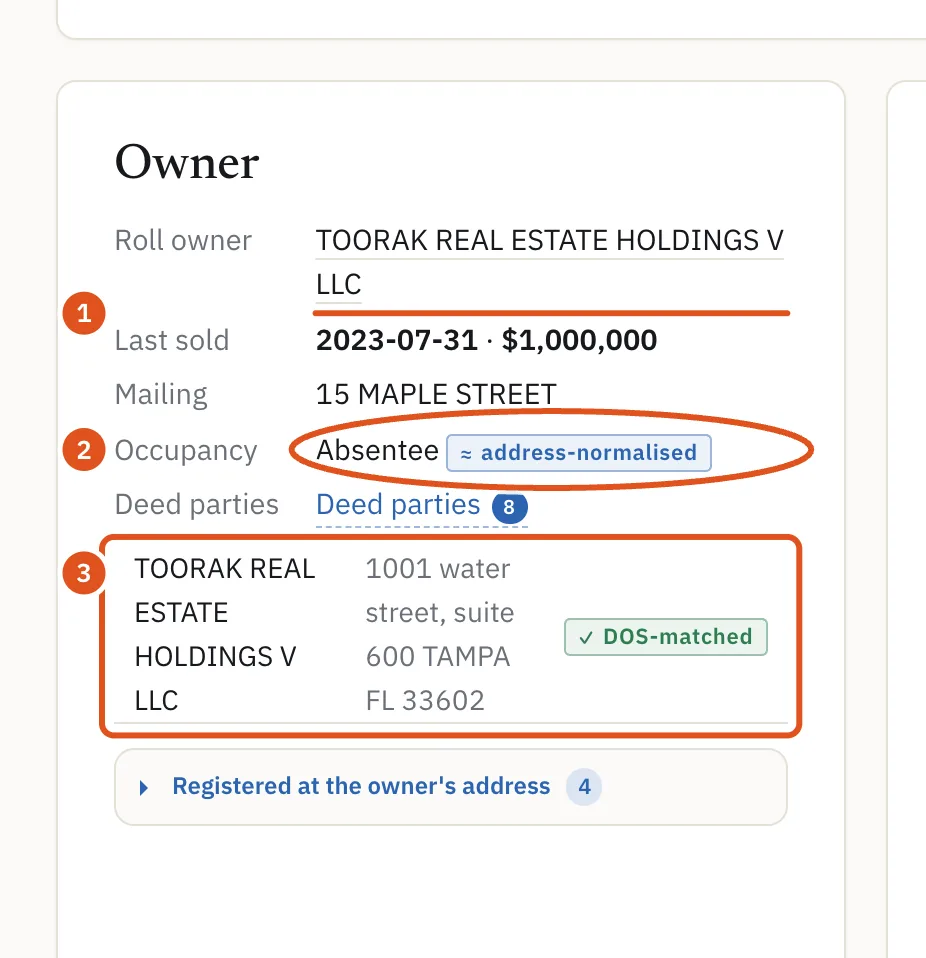
- Owner on the tax roll
- Lives there or not
- Click the name for the company page
3. Open the company page
Click the company's name. Its page sets out what the registry says about it:
- Registration gives the Legal name, Type, DOS id, Legal papers to and Registered office. The name under Legal papers to is often a person: sometimes the owner, often a lawyer or a filing service.
- Addresses lists the mailing addresses on deeds the company bought. They often differ from the registered office, and they are usually the ones that reach a human.
- Buildings held counts and lists what the company holds now.
- Co-registered entities lists other companies filing from the same registered office.
If the page opens with a warning that several registered companies share this name, treat everything on it as a lead rather than an identity. More in Company pages.
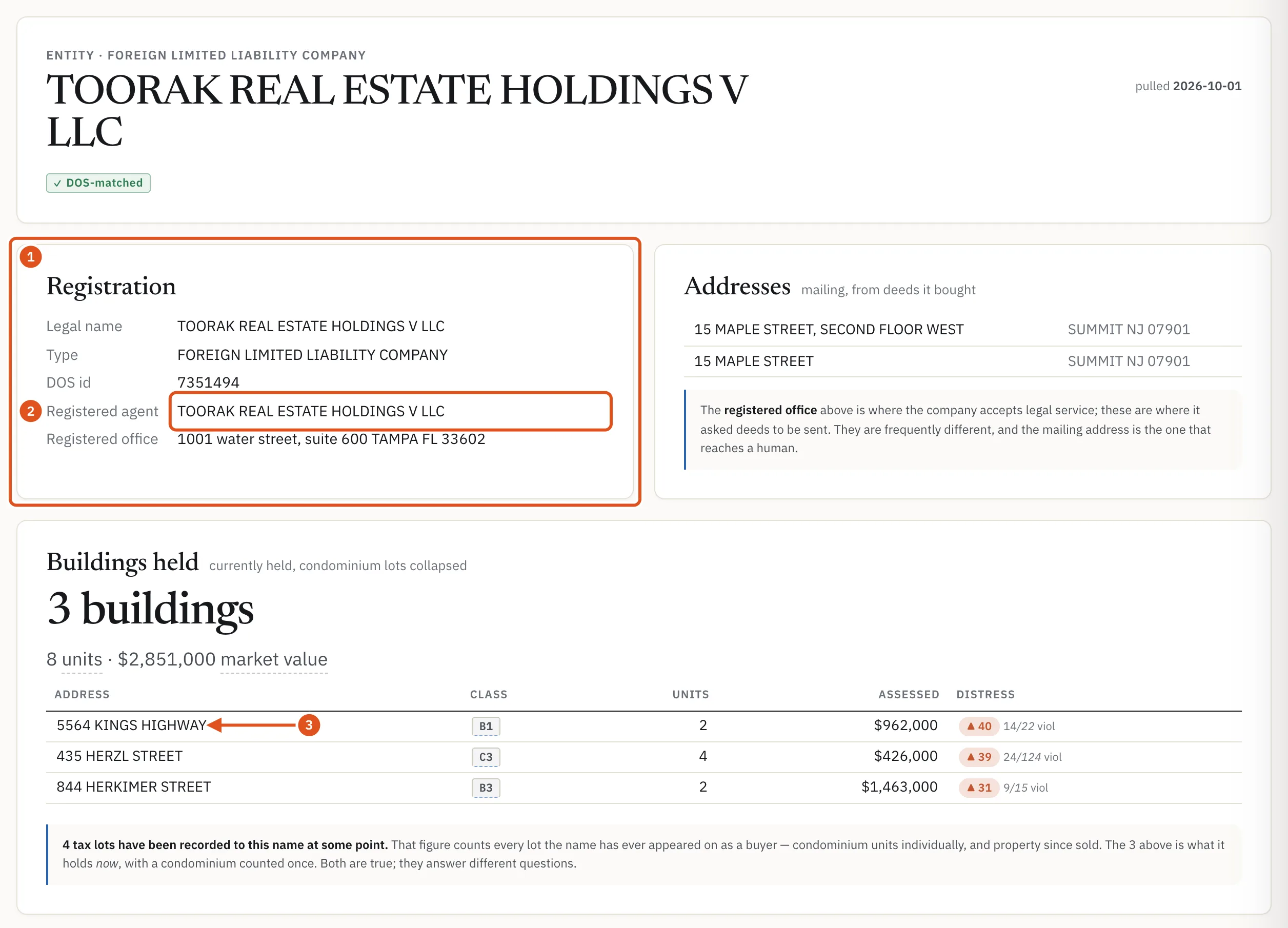
- What the registry says
- Often the person behind it
- Its other buildings
4. Follow the office
Operators usually hold each building in its own LLC, and file those LLCs from one office. Two ways to see them together:
- On the property page's Owner's portfolio card, the Registered office on the right is a button. It opens Registered at this office: every company filing from that address, its Process agent and how many buildings it holds. See The registered-office list.
- In search results, the office ↗ link beside a company opens its office page: every company at that office and every building they hold, sorted by distress, with Book totals. Click a company in the left column to narrow the list. See Owner office pages.
When an address is a law firm, filing service or virtual office, BlockLot says Not listed — this is a registered-agent address instead of listing hundreds of unrelated companies.
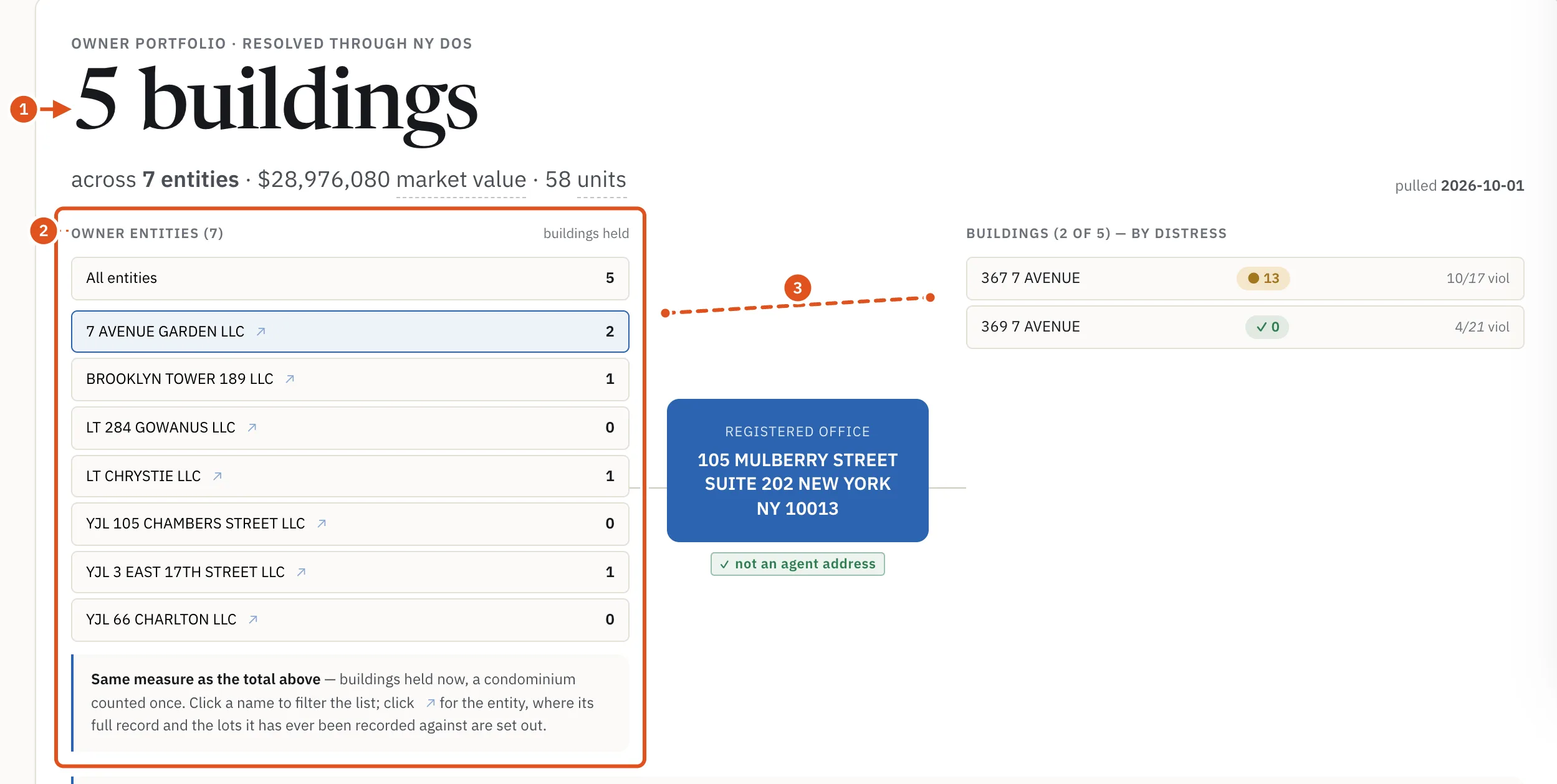
- Buildings held
- Companies at this office
- Click to filter
5. Read the whole portfolio
Back on the property page, the Owner's portfolio card adds it up: the number of buildings, across how many companies, with units and assessed value, a map and a table showing who holds each one. Its sub-heading says what the grouping rests on, such as through LLCs sharing a registered office. Buildings the owner has since sold are kept apart under Sold since — no longer held.
The Connected buildings card goes one step wider, to buildings linked through a shared registered office, an HPD registration (Housing Preservation and Development) or a shared deed mailing address. Every row names its Basis and Source, and What this cannot see lists the gaps. More in The owner's portfolio.
What to do next
- Check the contacts BlockLot found for the owner.
- Size the buildings up with Value a building.
- Run a due-diligence pass on the one you care about.
- Find more owners like this one with Absentee owners in a ZIP.