Tutorials · Owners and companies
Owner office pages
Every company that files from one registered office, and every building those companies hold, ranked by distress.
Many New York landlords hold each building in its own LLC, so the deed for one building names a company you have never heard of. The office page puts those companies back together. It takes one registered office, gathers every company that gives it as its address, and lists all the buildings they hold between them, worst-off first.
A company's registered office is the address it gives the New York Department of State (DOS), the State's business registry, as the place to receive legal papers. When a dozen LLCs all file from the same suite, they are very often run by the same people.
Getting there
The office page opens from search. Sign in, search for a company name, and look at the Owners & entities list. Next to a company whose office is a real operator's address, there is an office ↗ link. It opens the page for that office.
Every report you opened recently, office pages included, is listed on your home page and your account page, so you can come back to one without searching again.
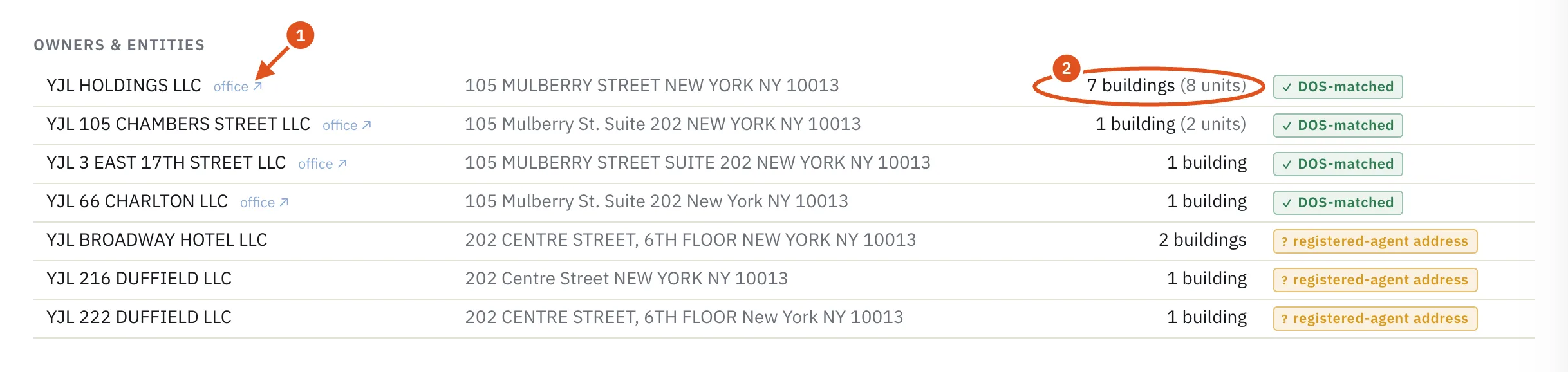
- Opens the office page
- Buildings this company holds
Reading the page
The headline
The eyebrow reads Owner portfolio · resolved through NY DOS. Under it, the large number is how many buildings the office's companies hold now, followed by how many companies there are, their combined market value and their total units. A condominium counts as one building, however many of its units the companies hold.
Companies, office and buildings
The card is laid out in three columns:
- Owner entities: each company filing from this office, with the number of buildings it holds. Click a company's name to filter the building list to that company alone; click All entities to see everything again. The ↗ beside a name opens that company's own page. See Company pages.
- Registered office: the address itself, marked not an agent address. Offices that serve as a mail drop for hundreds of unrelated companies, such as law firms and filing services, never get an office page, because grouping their clients would invent a portfolio.
- Buildings: every building the companies hold, sorted by distress, highest first. Each address opens the property page. The colored badge is the building's distress score out of 100, and the small figure after it is open violations over all violations on record.
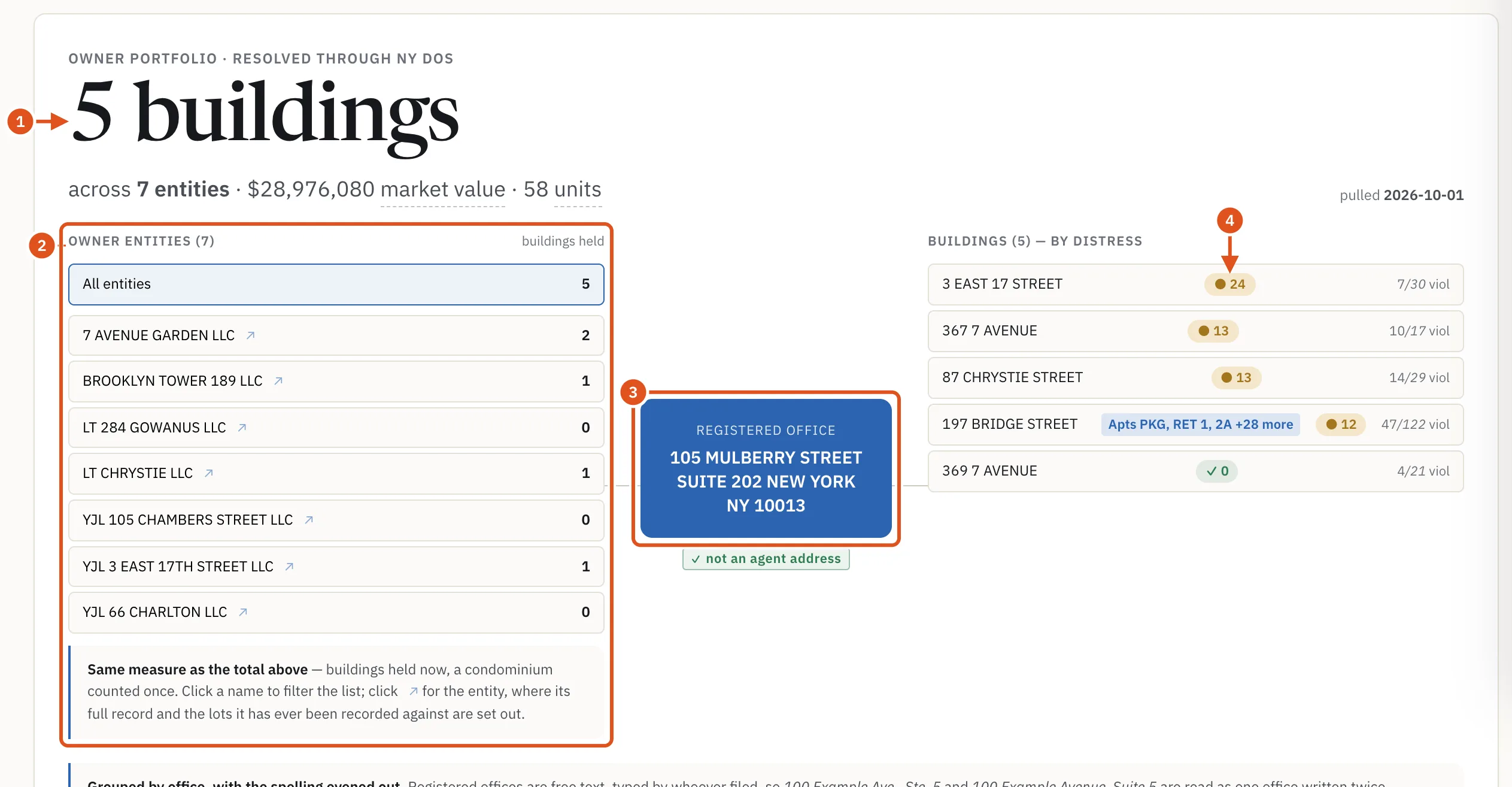
- Buildings held now
- Click a name to filter
- The shared address
- Worst-off first
Related companies that are not counted
Under the columns, BlockLot can show a few groups that it keeps out of the totals on purpose:
- Same building, other units: companies at the same street address but a different suite or apartment. One may be the same operator using a different unit; another may be an unrelated tenant in the same office tower. The data cannot tell which, so they are listed with their own building counts, and the note says what the total would be if they all belong.
- Also registered here — outside this cluster: other companies at this office. Most own no property. When one is marked owns with a building count, its buildings are missing from the totals above, usually because its filer typed the suite differently.
- If more than 50 companies file from a door, they are counted and not listed, because past that point the address is more likely a filing service than one operator.
Distress across the book
One bar per building. The pale bar is every violation on record, and the solid part is the share still open. Both numbers are shown because the open count alone hides a landlord who cleared hundreds of violations, and the total alone ranks history rather than the present.
Book totals
Four tiles for the whole portfolio: Open violations (with the total ever), Housing court (open cases), On a lien-sale list (buildings on the Department of Finance's lien-sale notice lists, which are notices, not liens sold) and Unused FAR (floor area the zoning would still allow, in square feet). BlockLot deliberately shows no loan-to-value figure, and the card explains why.
Dossier PDF opens your browser's print dialog, so you can save the page as a PDF.
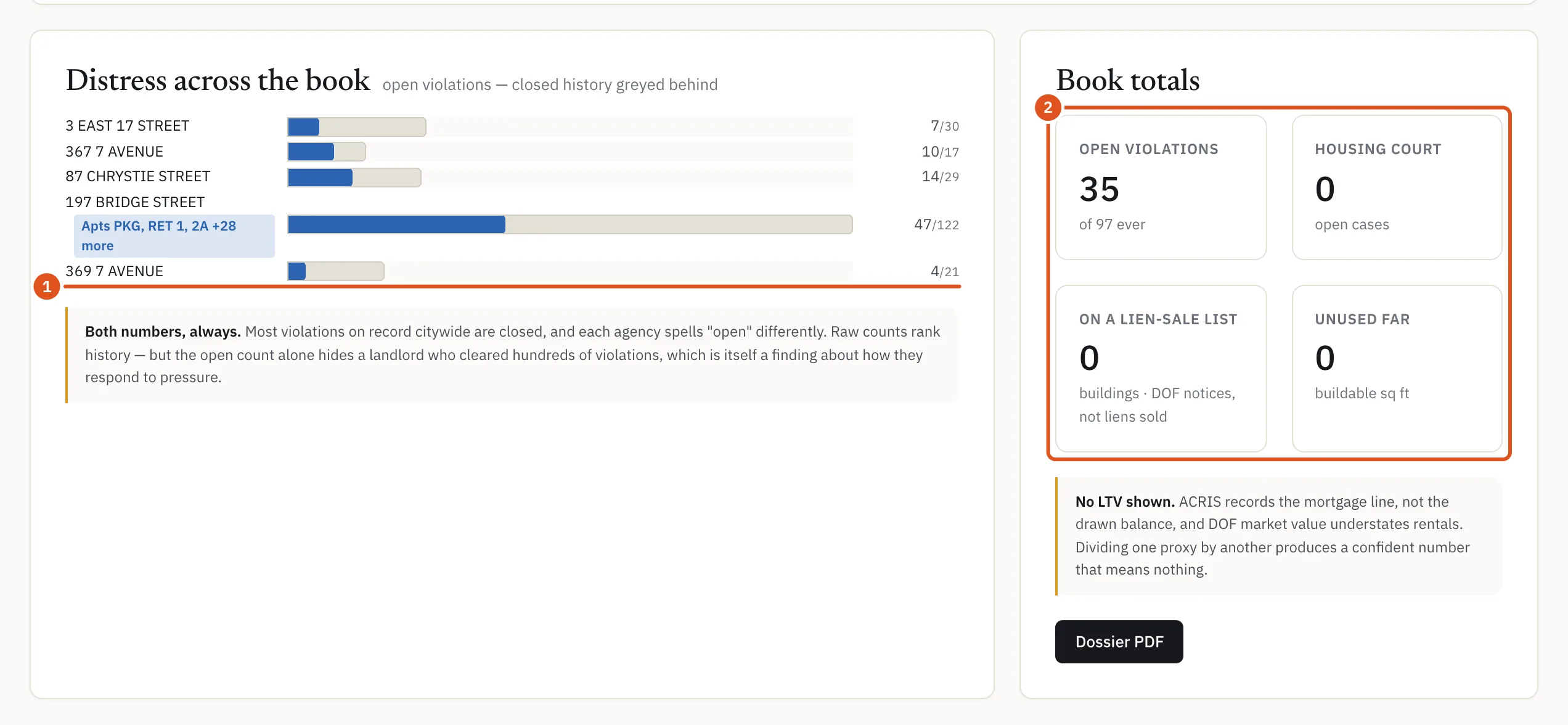
- Open over total
- The whole portfolio
Who can see it
The office page needs an account. A free account sees the layout with the details hidden; you need a plan that includes the owner's portfolio to see company names. Opening an office page counts as one report against your monthly allowance; opening the same page again in the same month does not count again. See Plans and billing.
Tips
- The office page groups companies by their registered office. The Owner's portfolio card on a property page groups owners in a broader way, and it is often the better starting point. See The owner's portfolio.
- To see everything filed from an office without leaving a property page, use the Registered office link in that card. See Registered at this office.