Reading the numbers
Open the explanation behind a code or a figure, open the rows behind a count, and read dates, sources and hidden values correctly.
Property records are full of codes and figures that mean little on their own: a building class of K4, an R6B zoning district, a "market value" that is not a sale price. BlockLot is built so that you can ask any of them what it means, and see the records any count is made from, without leaving the page.
Explanations for codes and terms
Two kinds of thing on a page open an explanation:
- A code, such as a building class, a zoning district, a deed's document type or a flood zone, appears as a small chip. Click the code itself.
- A term, such as BBL, Block, Lot, Units or a floor area ratio (FAR), appears as a label next to its number. Click the label, not the number.
The explanation opens in a panel on the right. It says what the field is, what this particular value means, and, for a code, the rest of its family. Building classes come in families, so looking up K4 once shows you the whole K group of stores, and the next K code you see needs no lookup. The panel ends by naming the published list the definition was transcribed from. A code the City has not defined is shown as plain text, with nothing to click, rather than with a guess.
Explanations work for everyone, whether or not you are signed in.
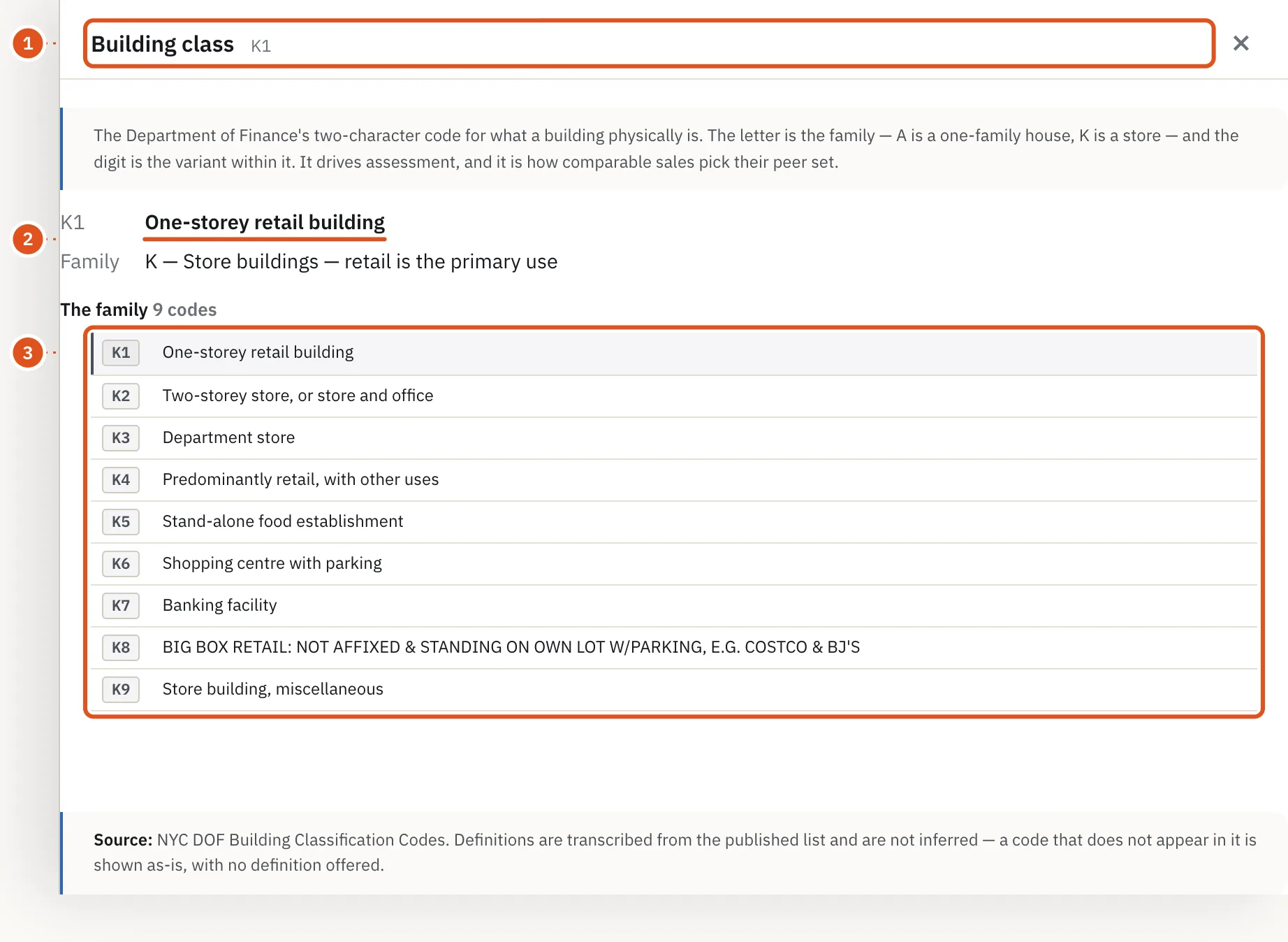
- The code you clicked
- What this value means
- Its family
A few common terms:
- BBL is the borough-block-lot number that identifies a tax lot, written as ten digits: one for the borough, five for the block, four for the lot.
- FAR, the floor area ratio, is a building's floor area divided by its lot area. Zoning sets the maximum.
- Market value and assessed value on the tax roll are the Department of Finance's basis for property tax, not an estimate of what the building would sell for.
Every count opens the rows behind it
On a full property report, the Records card groups the building's records by question: distress, transactions and debt, construction, tax and value, contacts, the area, and occupants. Each button carries a count, and where a record can be open or closed, both are spelled out, for example "Violations (3 open; 41 closed)". The words follow each agency's own vocabulary: violations close, vacate orders are rescinded, FDNY vacate orders are lifted. A building with no pending housing-court cases but many closed ones tells a different story from a building with none at all, which is why both numbers are shown. Counts elsewhere on the page, such as the history and exemptions lines in the tax card, open the same way.
Click a count and its rows open in the panel on the right:
- A short note at the top says what the records are and, where it matters, what they are not.
- Where the City has its own system of record, a link with an arrow (↗) opens it, for example the recorded document in ACRIS, the City Register's online records.
- In most panels, click a column heading to sort the rows by it.
- A row marked changes recorded has changed since BlockLot began watching that source. Click it to see what changed and when.
- A long list says Showing the first … rows at the bottom.
Close the panel with the × or by clicking outside it.
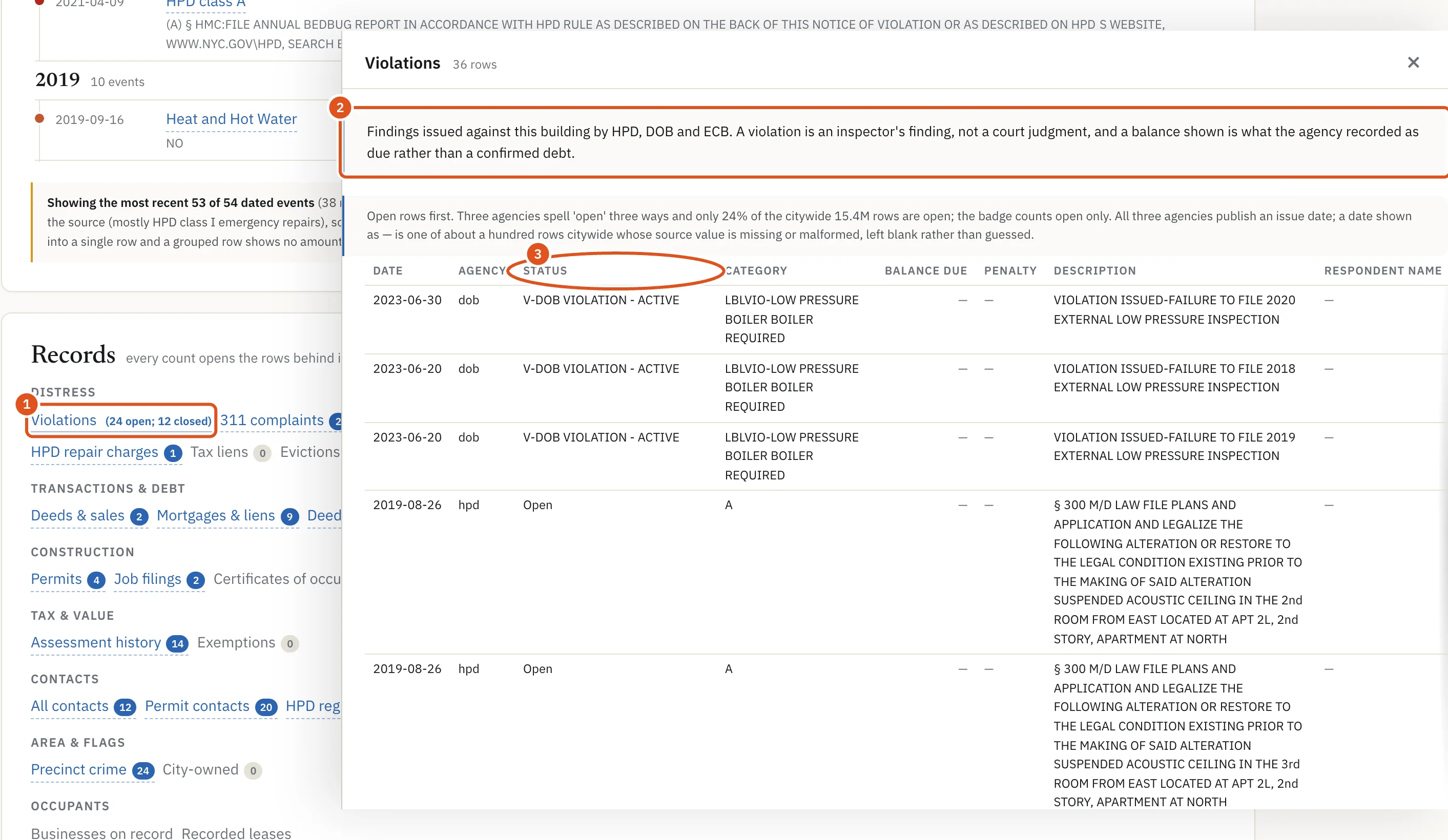
- Click to open
- What these records are
- Click to sort
The rows come with a report, so you need a plan with a monthly allowance to open them. Opening them on a building you have already opened this period does not use another report.
Where a fact comes from, and when
Every fact in BlockLot comes from a public source, and the page says which one. The property page shows when BlockLot last read the building's record, as pulled and a date. The Sources & licences page, linked at the foot of every page, lists every source with the date it was last retrieved.
Anything BlockLot works out for itself, such as the owner behind an LLC, an owner's other buildings, the distress score or comparable sales, is labeled as BlockLot's reading of the public record. It is not a fact the City states. Before you rely on one, open the rows behind it and check them.
Times are New York time
Every date and time BlockLot prints, on pages and in the PDF, is New York time, so a date is the New York day. A time of day is marked ET, for example "30 Sep 2026, 3:29 AM ET". Dates the City records as calendar days, such as a sale date or a filing date, are shown exactly as recorded.
Hidden values
Where your plan does not include a value, or you are not signed in, BlockLot hides it but keeps the shape of the page, so you can see what is there:
- names appear as •••••••••••
- amounts as $••,•••
- dates as ••/••/••••
- counts as ••
The dots are always the same length, so they say nothing about the value behind them. A hidden section often carries a line such as Owner names are hidden on the free view, with a link to the plans that include it. Accounts and plans explains what each plan shows.